What's inside
Form content
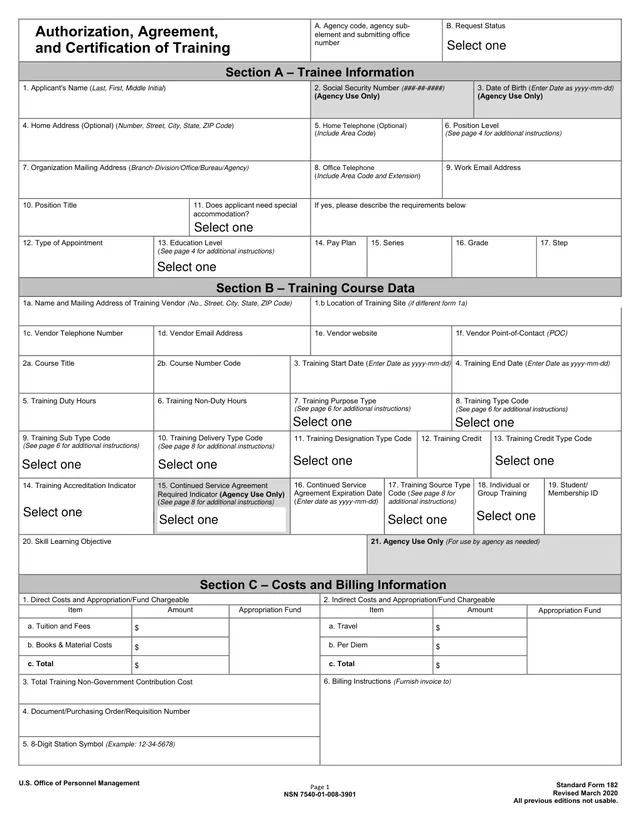
Authorization, Agreement, and Certification of Training
A. Agency code, agency sub- element and submitting office number
B. Request Status
Section A – Trainee Information
1. Applicant's Name (Last, First, Middle Initial)
2. Social Security Number (###-##-####)
(Agency Use Only)
3. Date of Birth (Enter Date as yyyy-mm-dd)
(Agency Use Only)
4. Home Address (Optional) (Number, Street, City, State, ZIP Code)
5. Home Telephone (Optional)
(Include Area Code)
6. Position Level
(See page 4 for additional instructions)
7. Organization Mailing Address (Branch-Division/Office/Bureau/Agency)
8. Office Telephone
(Include Area Code and Extension)
9. Work Email Address
10. Position Title
11. Does applicant need special accommodation?
If yes, please describe the requirements below
12. Type of Appointment
13. Education Level
(See page 4 for additional instructions)
14. Pay Plan
15. Series
16. Grade
17. Step
Section B – Training Course Data
1a. Name and Mailing Address of Training Vendor (No., Street, City, State, ZIP Code)
1.b Location of Training Site (if different form 1a)
1c. Vendor Telephone Number
1d. Vendor Email Address
1e. Vendor website
1f. Vendor Point-of-Contact (POC)
2a. Course Title
2b
How to fill it
Fill or edit this form in MePDF
- Preview page 1 to confirm the form name and revision.
- Select Fill form to answer the form one page at a time.
- Type an answer for each field; checkboxes and choices use the form’s own options.
- Preview the finished pages, then download the flattened PDF.
- The downloaded copy is image-only, so it cannot be edited as a form again.
Check the school's name and the term before signing. The editor keeps the original layout while you fill the existing fields.