What's inside
Form content
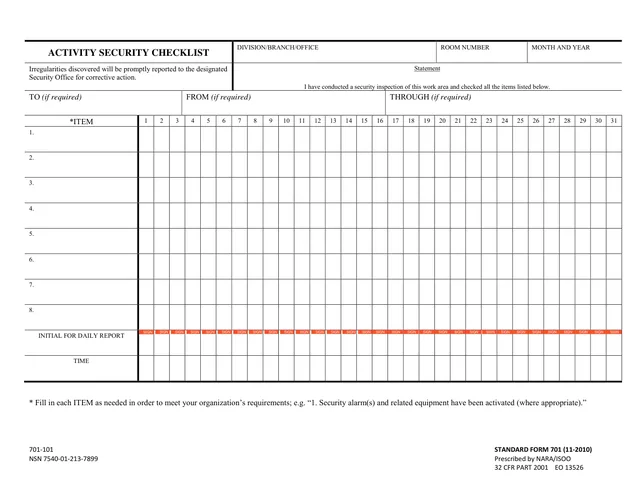
ACTIVITY SECURITY CHECKLIST
DIVISION/BRANCH/OFFICE
ROOM NUMBER
MONTH AND YEAR
Irregularities discovered will be promptly reported to the designated
Statement
Security Office for corrective action.
I have conducted a security inspection of this work area and checked all the items listed below.
TO (if required)
FROM (if required)
THROUGH (if required)
*ITEM
1
2
3
4
5
6
7
8
9
10
11
12
13
14
15
16
17
18
19
20
21
22
23
24
25
26
27
28
29
30
31
1.
2.
3.
4.
5.
6.
7.
8.
INITIAL FOR DAILY REPORT
TIME
* Fill in each ITEM as needed in order to meet your organization’s requirements; e.g. “1. Security alarm(s) and related equipment have been activated (where appropriate).”
701-101
STANDARD FORM 701 (11-2010)
NSN 7540-01-213-7899
Prescribed by NARA/ISOO
32 CFR PART 2001 EO 13526
SIGN
SIGN
SIGN
SIGN
SIGN
SIGN
SIGN
SIGN
SIGN
SIGN
SIGN
SIGN
SIGN
SIGN
SIGN
SIGN
SIGN
SIGN
SIGN
SIGN
SIGN
SIGN
SIGN
SIGN
SIGN
SIGN
SIGN
SIGN
SIGN
SIGN
SIGN
How to fill it
Fill or edit this form in MePDF
- Preview page 1 to confirm the form name and revision.
- Select Fill form to answer the form one page at a time.
- Type an answer for each field; checkboxes and choices use the form’s own options.
- Preview the finished pages, then download the flattened PDF.
- The downloaded copy is image-only, so it cannot be edited as a form again.
Use the service member's full legal name and current unit details. The editor keeps the original layout while you fill the existing fields.