What's inside
Form content
When to Use This Form:
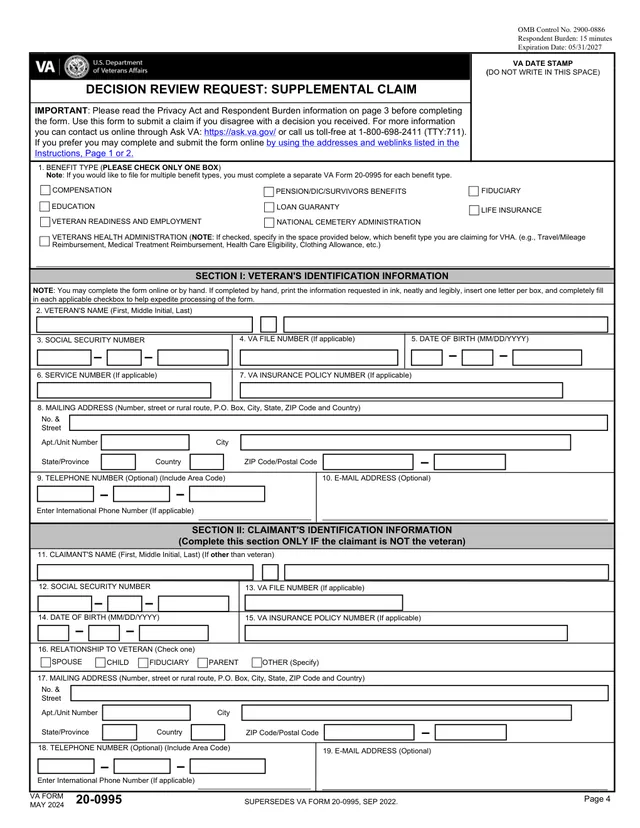
Use this form, VA Form 20-0995, Decision Review Request: Supplemental Claim, to submit a supplemental claim of the decision you received that you disagree with.
Note: A supplemental claim is a new review of an issue(s) previously decided by the Department of Veterans Affairs (VA) based on submission of new and relevant evidence. For additional information on the supplemental claim process or other decision review options such as a higher-level review and appeal to the Board of Veterans' Appeals (BVA), visit www.va.gov/decision-reviews/. This form should only be used if you DISAGREE with a decision you received.
• If you feel your condition has worsened and is no longer accurately reflected by the level of disability assigned by VA, use
VA Form 21-526EZ, Application for Disability Compensation and Related Compensation Benefits, to request an increased evaluation.
You may also submit your claim online, more information is available at www.va.gov/disability.
• If you want to file a request for higher-level review, use VA Form 20-0996, Decision Review Request: Higher-Level Review.
• You can also appeal to the BVA by using VA Form 10182, Decision Review Request: B
How to fill it
Fill or edit this form in MePDF
- Preview page 4 to confirm the form name and revision.
- Select Fill form to answer the form one page at a time.
- Type an answer for each field; checkboxes and choices use the form’s own options.
- Preview the finished pages, then download the flattened PDF.
- The downloaded copy is image-only, so it cannot be edited as a form again.
Use the service member's full legal name and current unit details. The editor keeps the original layout while you fill the existing fields.