What's inside
Form content
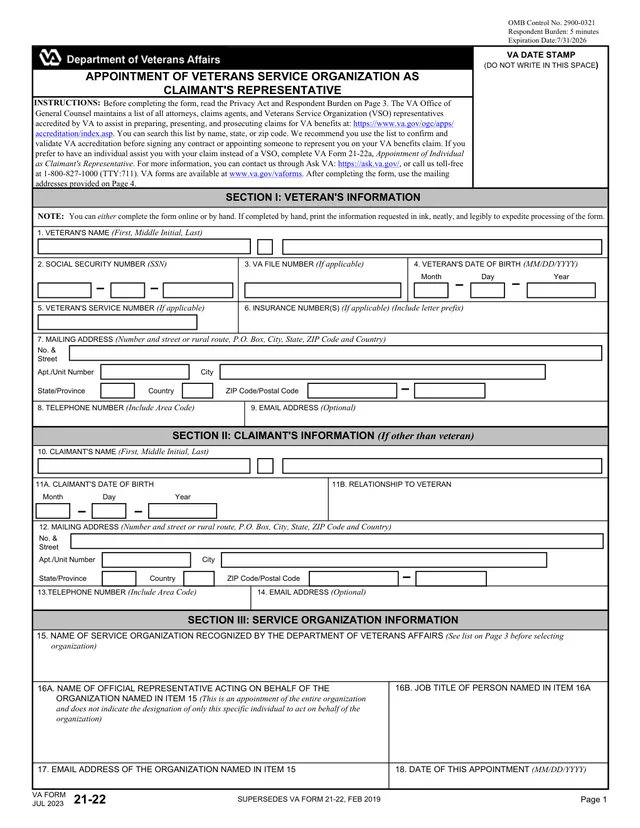
Before completing the form, read the Privacy Act and Respondent Burden on Page 3. The VA Office of
General Counsel maintains a list of all attorneys, claims agents, and Veterans Service Organization (VSO) representatives accredited by VA to assist in preparing, presenting, and prosecuting claims for VA benefits at: https://www.va.gov/ogc/apps/ accreditation/index.asp. You can search this list by name, state, or zip code. We recommend you use the list to confirm and validate VA accreditation before signing any contract or appointing someone to represent you on your VA benefits claim. If you prefer to have an individual assist you with your claim instead of a VSO, complete VA Form 21-22a, Appointment of Individual as Claimant's Representative. For more information, you can contact us through Ask VA: https://ask.va.gov/, or call us toll-free at 1-800-827-1000 (TTY:711). VA forms are available at www.va.gov/vaforms. After completing the form, use the mailing addresses provided on Page 4.
SECTION III: SERVICE ORGANIZATION INFORMATION
SECTION II: CLAIMANT'S INFORMATION (If other than veteran)
SECTION I: VETERAN'S INFORMATION
11B. RELATIONSHIP TO VETERAN
APPOINTMENT OF VETERANS SERVICE OR
How to fill it
Fill or edit this form in MePDF
- Preview page 1 to confirm the form name and revision.
- Select Fill form to answer the form one page at a time.
- Type an answer for each field; checkboxes and choices use the form’s own options.
- Preview the finished pages, then download the flattened PDF.
- The downloaded copy is image-only, so it cannot be edited as a form again.
Use the service member's full legal name and current unit details. The editor keeps the original layout while you fill the existing fields.