What's inside
Form content
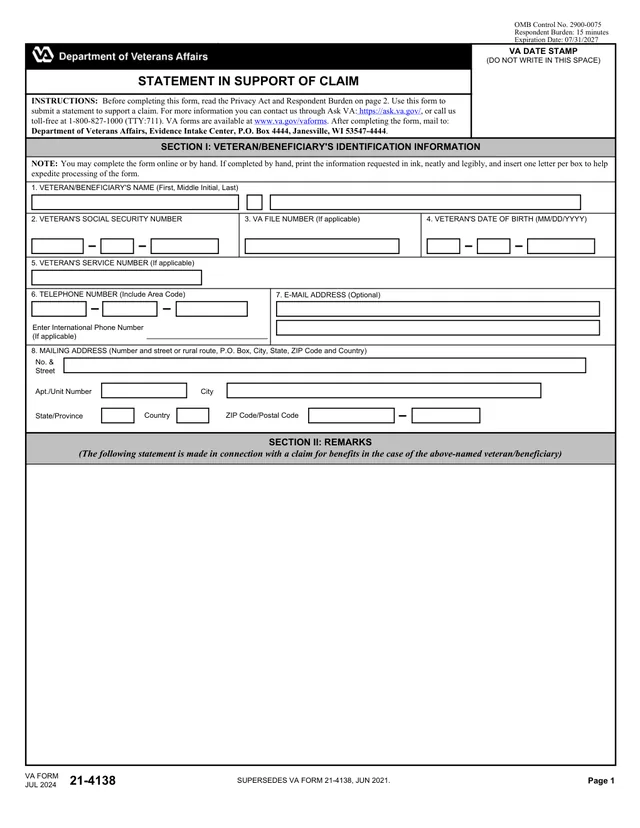
SECTION I: VETERAN/BENEFICIARY'S IDENTIFICATION INFORMATION
SECTION II: REMARKS
(The following statement is made in connection with a claim for benefits in the case of the above-named veteran/beneficiary)
STATEMENT IN SUPPORT OF CLAIM
VA FORM
JUL 2024
21-4138
OMB Control No. 2900-0075
Respondent Burden: 15 minutes
Expiration Date: 07/31/2027
SUPERSEDES VA FORM 21-4138, JUN 2021.
Page 1
Before completing this form, read the Privacy Act and Respondent Burden on page 2. Use this form to submit a statement to support a claim. For more information you can contact us through Ask VA: https://ask.va.gov/, or call us toll-free at 1-800-827-1000 (TTY:711). VA forms are available at www.va.gov/vaforms. After completing the form, mail to:
Department of Veterans Affairs, Evidence Intake Center, P.O. Box 4444, Janesville, WI 53547-4444.
VA DATE STAMP
(DO NOT WRITE IN THIS SPACE)
4. VETERAN'S DATE OF BIRTH (MM/DD/YYYY)
2. VETERAN'S SOCIAL SECURITY NUMBER
3. VA FILE NUMBER (If applicable)
1. VETERAN/BENEFICIARY'S NAME (First, Middle Initial, Last)
5. VETERAN'S SERVICE NUMBER (If applicable)
No. &
Street
8. MAILING ADDRESS (Number and street or rural route, P.O. Box, City, State, ZIP Code and Count
How to fill it
Fill or edit this form in MePDF
- Preview page 1 to confirm the form name and revision.
- Select Fill form to answer the form one page at a time.
- Type an answer for each field; checkboxes and choices use the form’s own options.
- Preview the finished pages, then download the flattened PDF.
- The downloaded copy is image-only, so it cannot be edited as a form again.
Use the service member's full legal name and current unit details. The editor keeps the original layout while you fill the existing fields.