What's inside
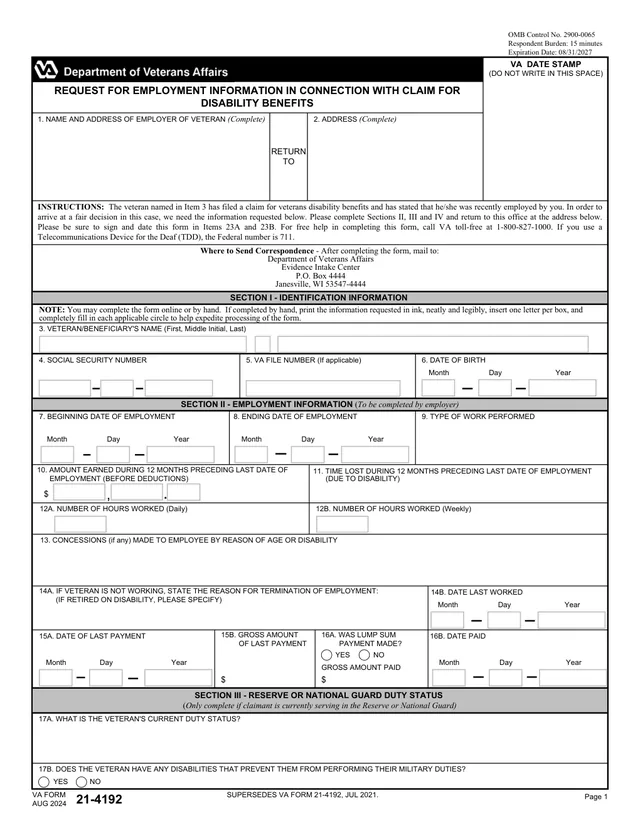
Form content
SECTION III - RESERVE OR NATIONAL GUARD DUTY STATUS
(Only complete if claimant is currently serving in the Reserve or National Guard)
SECTION II - EMPLOYMENT INFORMATION (To be completed by employer)
SECTION I - IDENTIFICATION INFORMATION
7. BEGINNING DATE OF EMPLOYMENT
INSTRUCTIONS: The veteran named in Item 3 has filed a claim for veterans disability benefits and has stated that he/she was recently employed by you. In order to arrive at a fair decision in this case, we need the information requested below. Please complete Sections II, III and IV and return to this office at the address below.
Please be sure to sign and date this form in Items 23A and 23B. For free help in completing this form, call VA toll-free at 1-800-827-1000. If you use a
Telecommunications Device for the Deaf (TDD), the Federal number is 711.
REQUEST FOR EMPLOYMENT INFORMATION IN CONNECTION WITH CLAIM FOR
DISABILITY BENEFITS
OMB Control No. 2900-0065
Respondent Burden: 15 minutes
Expiration Date: 08/31/2027
2. ADDRESS (Complete)
1. NAME AND ADDRESS OF EMPLOYER OF VETERAN (Complete)
8. ENDING DATE OF EMPLOYMENT
10. AMOUNT EARNED DURING 12 MONTHS PRECEDING LAST DATE OF
EMPLOYMENT (BEFORE DEDUCTIONS)
11. TIME L
How to fill it
Fill or edit this form in MePDF
- Preview page 1 to confirm the form name and revision.
- Select Fill form to answer the form one page at a time.
- Type an answer for each field; checkboxes and choices use the form’s own options.
- Preview the finished pages, then download the flattened PDF.
- The downloaded copy is image-only, so it cannot be edited as a form again.
Use the service member's full legal name and current unit details. The editor keeps the original layout while you fill the existing fields.