What's inside
Form content
OMB Approved No. 2900-0049
Respondent Burden: 5 minutes
Expiration Date: 11/30/2027
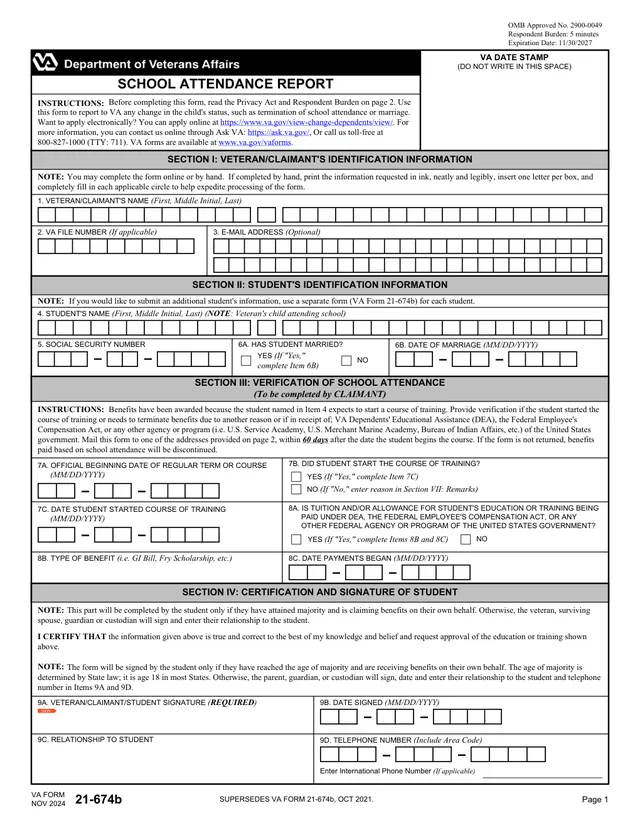
SCHOOL ATTENDANCE REPORT
INSTRUCTIONS: Before completing this form, read the Privacy Act and Respondent Burden on page 2. Use this form to report to VA any change in the child's status, such as termination of school attendance or marriage.
Want to apply electronically? You can apply online at https://www.va.gov/view-change-dependents/view/. For more information, you can contact us online through Ask VA: https://ask.va.gov/, Or call us toll-free at
800-827-1000 (TTY: 711). VA forms are available at www.va.gov/vaforms.
VA DATE STAMP
(DO NOT WRITE IN THIS SPACE)
SECTION I: VETERAN/CLAIMANT'S IDENTIFICATION INFORMATION
NOTE: You may complete the form online or by hand. If completed by hand, print the information requested in ink, neatly and legibly, insert one letter per box, and completely fill in each applicable circle to help expedite processing of the form.
1. VETERAN/CLAIMANT'S NAME (First, Middle Initial, Last)
2. VA FILE NUMBER (If applicable)
3. E-MAIL ADDRESS (Optional)
SECTION II: STUDENT'S IDENTIFICATION INFORMATION
NOTE: If you would like to submit an additional student's information, use a
How to fill it
Fill or edit this form in MePDF
- Preview page 1 to confirm the form name and revision.
- Select Fill form to answer the form one page at a time.
- Type an answer for each field; checkboxes and choices use the form’s own options.
- Preview the finished pages, then download the flattened PDF.
- The downloaded copy is image-only, so it cannot be edited as a form again.
Check the school's name and the term before signing. The editor keeps the original layout while you fill the existing fields.