What's inside
Form content
SECTION I - VETERAN'S IDENTIFICATION INFORMATION
SECTION II - TRAINING PAY INFORMATION
OMB Approved No. 2900-0463
Respondent Burden: 10 minutes
Expiration Date: 3/31/2026
4. DATE OF BIRTH (MM/DD/YYYY)
NOTICE OF WAIVER OF VA COMPENSATION OR PENSION TO
RECEIVE MILITARY PAY AND ALLOWANCES
A fiscal year runs from October 1 through September 30. For example, fiscal year 2017 runs from October 1, 2016 through September 30,
2017.
Please note that the National Guard and Reserves report one full day's duty pay for each 4-hour session of training you attend. That means they may credit you with 4 days' worth of training for a 2-day drill weekend. The National Guard and Reserves pay most of their members for about 63 training days during a fiscal year. That included 48 armory drills or training sessions, and 15 days of active training.
Please fill out this form, sign it, have your unit commander or commander's designee sign it, and return it to one of the 3 addresses listed on page 3.
TO
VA DATE STAMP
(DO NOT WRITE IN THIS SPACE)
7. EMAIL ADDRESS (Optional)
FROM
NAME AND ADDRESS OF VETERAN
3. VA FILE NUMBER
We need this information to determine whether you choose to waive your VA compensation
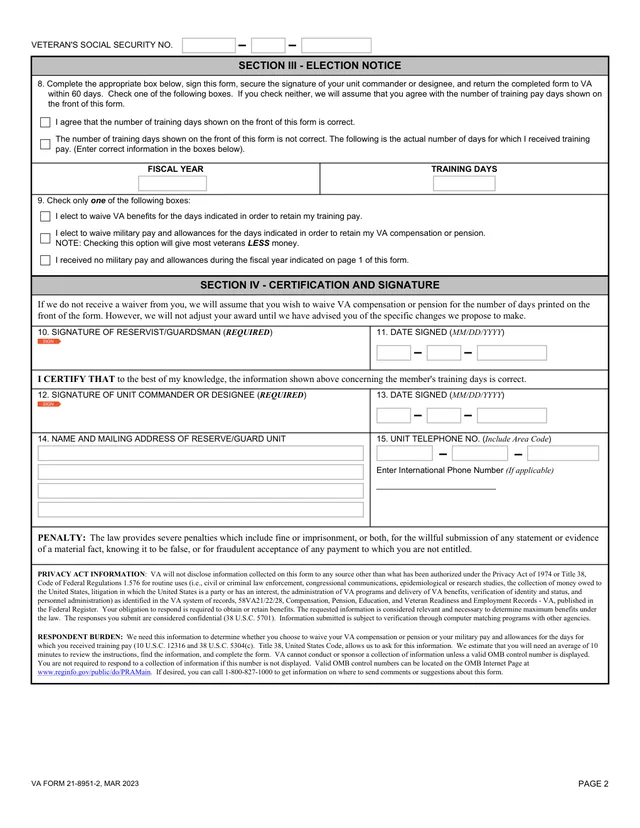
How to fill it
Fill or edit this form in MePDF
- Preview page 2 to confirm the form name and revision.
- Select Fill form to answer the form one page at a time.
- Type an answer for each field; checkboxes and choices use the form’s own options.
- Preview the finished pages, then download the flattened PDF.
- The downloaded copy is image-only, so it cannot be edited as a form again.
Use the service member's full legal name and current unit details. The editor keeps the original layout while you fill the existing fields.