What's inside
Form content
PART III - RELATIONSHIP AND BENEFIT INFORMATION
SECTION I - SPOUSE/SURVIVING SPOUSE
PART I - APPLICANT INFORMATION
PART II - QUALIFYING INDIVIDUAL INFORMATION (See instructions for Items 13A, 13B and 13C)
DEPENDENTS' APPLICATION FOR VA EDUCATION BENEFITS
(Under Provisions of chapters 33 and 35, of title 38, U.S.C.)
ACCOUNT NUMBER
22-5490
VA FORM
JAN 2025
6. TELEPHONE NUMBER(S) (Including Area Code)
OMB Approved No. 2900-0098
Respondent Burden: 25 minutes
Expiration Date: 01/31/2028
2. SEX
4. NAME (First name, middle initial, last name)
ROUTING OR TRANSIT NUMBER
(Routing number must be 9 digits)
7. EMAIL ADDRESS (If applicable)
3. DATE OF BIRTH
(MM/DD/YYYY)
5. CURRENT MAILING ADDRESS (Number and street or rural route, P.O. Box, City, State and ZIP Code)
1. SOCIAL SECURITY NUMBER
10. SOCIAL SECURITY NUMBER OR VA FILE NUMBER
13A. DID PARENT OR SPOUSE DIE FROM SERVICE-CONNECTED DISABILITY WITHIN 120 DAYS FOLLOWING DISCHARGE OR RELEASE FROM DUTY AS A
MEMBER OF THE ARMED FORCES (without regard to whether such duty was active duty)
11. BRANCH OF SERVICE
A. MOBILE
14. IS QUALIFYING INDIVIDUAL (PARENT OR SPOUSE) CURRENTLY ON ACTIVE DUTY?
SUPERSEDES VA FORM 22-5490, JAN 2024,
WHICH WILL NOT
How to fill it
Fill or edit this form in MePDF
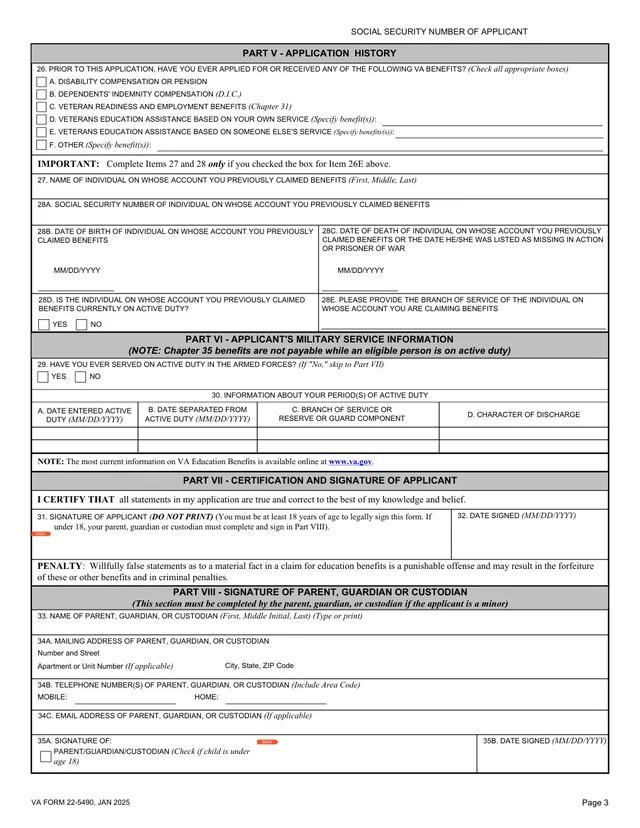
- Preview page 3 to confirm the form name and revision.
- Select Fill form to answer the form one page at a time.
- Type an answer for each field; checkboxes and choices use the form’s own options.
- Preview the finished pages, then download the flattened PDF.
- The downloaded copy is image-only, so it cannot be edited as a form again.
Use the service member's full legal name and current unit details. The editor keeps the original layout while you fill the existing fields.