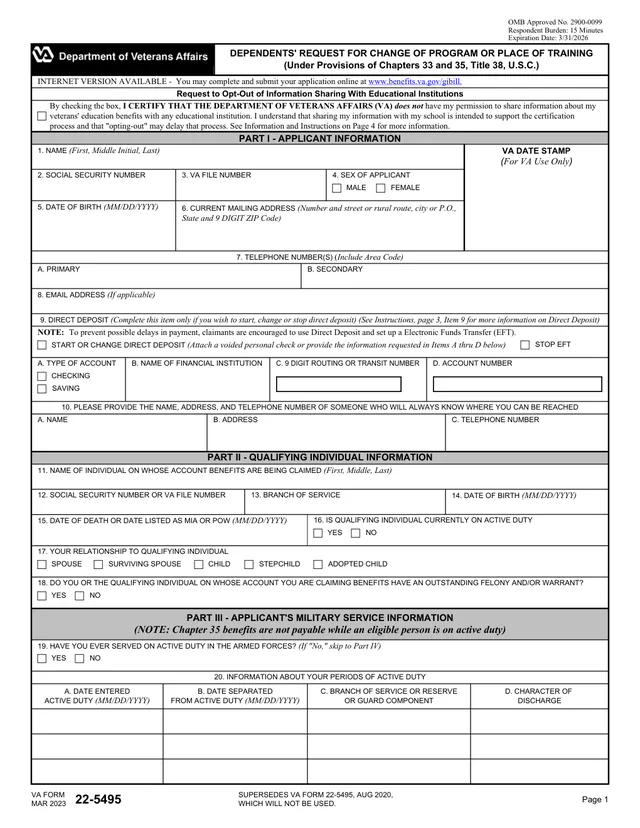
What's inside
Form content
PART I - APPLICANT INFORMATION
PART II - QUALIFYING INDIVIDUAL INFORMATION
PART III - APPLICANT'S MILITARY SERVICE INFORMATION
(NOTE: Chapter 35 benefits are not payable while an eligible person is on active duty)
OMB Approved No. 2900-0099
Respondent Burden: 15 Minutes
Expiration Date: 3/31/2026
DEPENDENTS' REQUEST FOR CHANGE OF PROGRAM OR PLACE OF TRAINING
(Under Provisions of Chapters 33 and 35, Title 38, U.S.C.)
INTERNET VERSION AVAILABLE - You may complete and submit your application online at www.benefits.va.gov/gibill.
Request to Opt-Out of Information Sharing With Educational Institutions
By checking the box, I CERTIFY THAT THE DEPARTMENT OF VETERANS AFFAIRS (VA) does not have my permission to share information about my veterans' education benefits with any educational institution. I understand that sharing my information with my school is intended to support the certification process and that "opting-out" may delay that process. See Information and Instructions on Page 4 for more information.
1. NAME (First, Middle Initial, Last)
VA DATE STAMP
(For VA Use Only)
2. SOCIAL SECURITY NUMBER
3. VA FILE NUMBER
4. SEX OF APPLICANT
5. DATE OF BIRTH (MM/DD/YYYY)
6. CURRENT MAILING
How to fill it
Fill or edit this form in MePDF
- Preview page 1 to confirm the form name and revision.
- Select Fill form to answer the form one page at a time.
- Type an answer for each field; checkboxes and choices use the form’s own options.
- Preview the finished pages, then download the flattened PDF.
- The downloaded copy is image-only, so it cannot be edited as a form again.
Use the service member's full legal name and current unit details. The editor keeps the original layout while you fill the existing fields.