What's inside
Form content
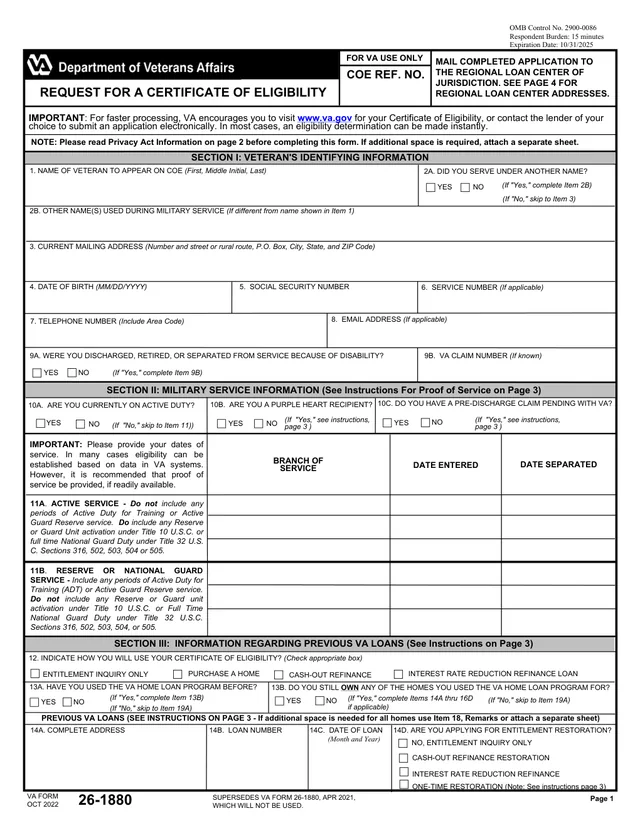
PREVIOUS VA LOANS (SEE INSTRUCTIONS ON PAGE 3 - If additional space is needed for all homes use Item 18, Remarks or attach a separate sheet)
SECTION I: VETERAN'S IDENTIFYING INFORMATION
NOTE: Please read Privacy Act Information on page 2 before completing this form. If additional space is required, attach a separate sheet.
REQUEST FOR A CERTIFICATE OF ELIGIBILITY
MAIL COMPLETED APPLICATION TO
THE REGIONAL LOAN CENTER OF
JURISDICTION. SEE PAGE 4 FOR
REGIONAL LOAN CENTER ADDRESSES.
1. NAME OF VETERAN TO APPEAR ON COE (First, Middle Initial, Last)
4. DATE OF BIRTH (MM/DD/YYYY)
OMB Control No. 2900-0086
Respondent Burden: 15 minutes
Expiration Date: 10/31/2025
VA FORM
OCT 2022
26-1880
SUPERSEDES VA FORM 26-1880, APR 2021,
WHICH WILL NOT BE USED.
9A. WERE YOU DISCHARGED, RETIRED, OR SEPARATED FROM SERVICE BECAUSE OF DISABILITY?
FOR VA USE ONLY
COE REF. NO.
5. SOCIAL SECURITY NUMBER
7. TELEPHONE NUMBER (Include Area Code)
(If "Yes," complete Item 2B)
8. EMAIL ADDRESS (If applicable)
Page 1
IMPORTANT: For faster processing, VA encourages you to visit www.va.gov for your Certificate of Eligibility, or contact the lender of your choice to submit an application electronically. In most cases,
How to fill it
Fill or edit this form in MePDF
- Preview page 1 to confirm the form name and revision.
- Select Fill form to answer the form one page at a time.
- Type an answer for each field; checkboxes and choices use the form’s own options.
- Preview the finished pages, then download the flattened PDF.
- The downloaded copy is image-only, so it cannot be edited as a form again.
Use the service member's full legal name and current unit details. The editor keeps the original layout while you fill the existing fields.