What's inside
Form content
OMB Approved No. 2900-0092
Respondent Burden: 45 Minutes
Expiration Date: 11/30/2027
INFORMATION FOR VETERAN READINESS AND
EMPLOYMENT ENTITLEMENT DETERMINATION
INSTRUCTIONS: This form is used during the comprehensive initial evaluation to assist with gathering information for an Entitlement Determination. For more information, contact us at https://ask.va.gov or call us toll-free at 1-800-827-1000. If you use a Telecommunications Device for the Deaf (TDD), the Federal relay number is
711. VA forms are available at www.va.gov/vaforms.
During the initial evaluation, the Vocational Rehabilitation Counselor (VRC) will review the form with the claimant to obtain additional and/or missing information necessary to determine the claimant's entitlement to Chapter 31 benefits. The VRC will use their counseling skills while utilizing this form to assist with making an entitlement determination. The VRC will review and discuss the responses from the claimant during the initial evaluation to address:
• Entitlement determination to VR&E Program, including Employment Handicap (EH) and Serious Handicap (SEH) determination, in accordance with 38 CFR § 21.51 and § 21.52.
• Assess the following facto
How to fill it
Fill or edit this form in MePDF
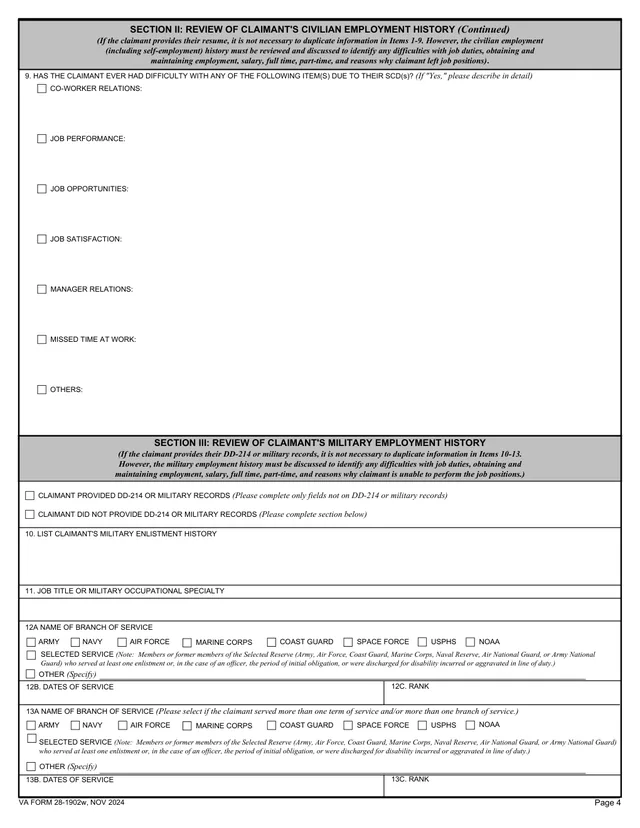
- Preview page 4 to confirm the form name and revision.
- Select Fill form to answer the form one page at a time.
- Type an answer for each field; checkboxes and choices use the form’s own options.
- Preview the finished pages, then download the flattened PDF.
- The downloaded copy is image-only, so it cannot be edited as a form again.
Use the service member's full legal name and current unit details. The editor keeps the original layout while you fill the existing fields.