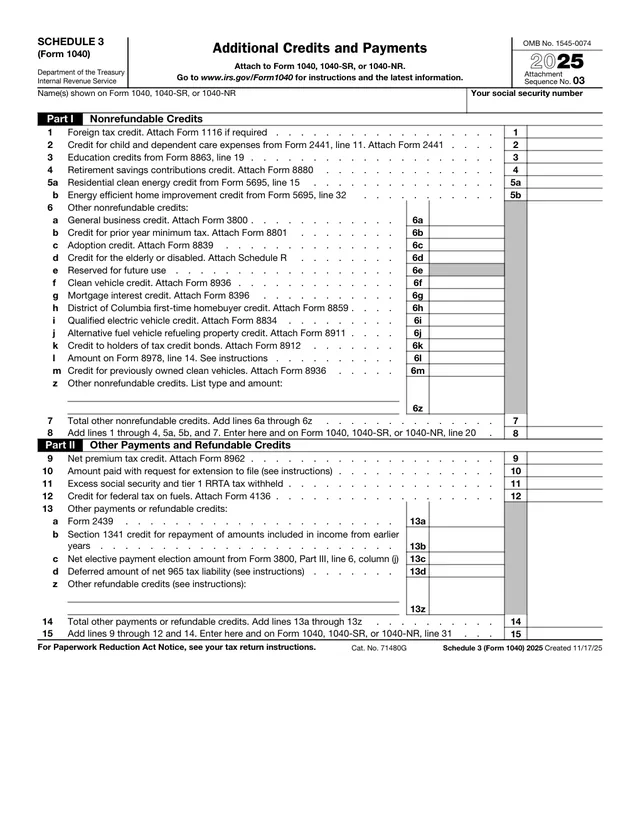
What's inside
Form content
(Form 1040)
2025
Additional Credits and Payments
Attach to Form 1040, 1040-SR, or 1040-NR.
Go to www.irs.gov/Form1040 for instructions and the latest information.
Attachment
Sequence No. 03
Name(s) shown on Form 1040, 1040-SR, or 1040-NR
Your social security number
Part I
Nonrefundable Credits
1
Foreign tax credit. Attach Form 1116 if required .
.
.
.
.
.
.
.
.
.
.
.
.
.
.
.
.
.
1
2
Credit for child and dependent care expenses from Form 2441, line 11. Attach Form 2441 .
.
.
.
2
3
Education credits from Form 8863, line 19 .
.
.
.
.
.
.
.
.
.
.
.
.
.
.
.
.
.
.
.
3
4
Retirement savings contributions credit. Attach Form 8880
.
.
.
.
.
.
.
.
.
.
.
.
.
.
4
5a
Residential clean energy credit from Form 5695, line 15
.
.
.
.
.
.
.
.
.
.
.
.
.
.
.
5a b
Energy efficient home improvement credit from Form 5695, line 32
.
.
.
.
.
.
.
.
.
.
.
5b
6
Other nonrefundable credits:
a
General business credit. Attach Form 3800 .
.
.
.
.
.
.
.
.
.
.
.
6a b
Credit for prior year minimum tax. Attach Form 8801
.
.
.
.
.
.
.
.
6b c
Adoption credit. Attach Form 8839
.
.
.
.
.
.
.
.
.
.
.
.
.
.
6c d
Credit for the elderly or disabled. Attach Schedule R
.
.
.
.
.
.
.
.
6d e
Reserved for future use .
.
.
.
.
.
.
How to fill it
Fill or edit this form in MePDF
- Preview page 1 to confirm the form name and revision.
- Select Fill form to answer the form one page at a time.
- Type an answer for each field; checkboxes and choices use the form’s own options.
- Preview the finished pages, then download the flattened PDF.
- The downloaded copy is image-only, so it cannot be edited as a form again.
Keep the tax year and filing status consistent on every page. The editor keeps the original layout while you fill the existing fields.