What's inside
Form content
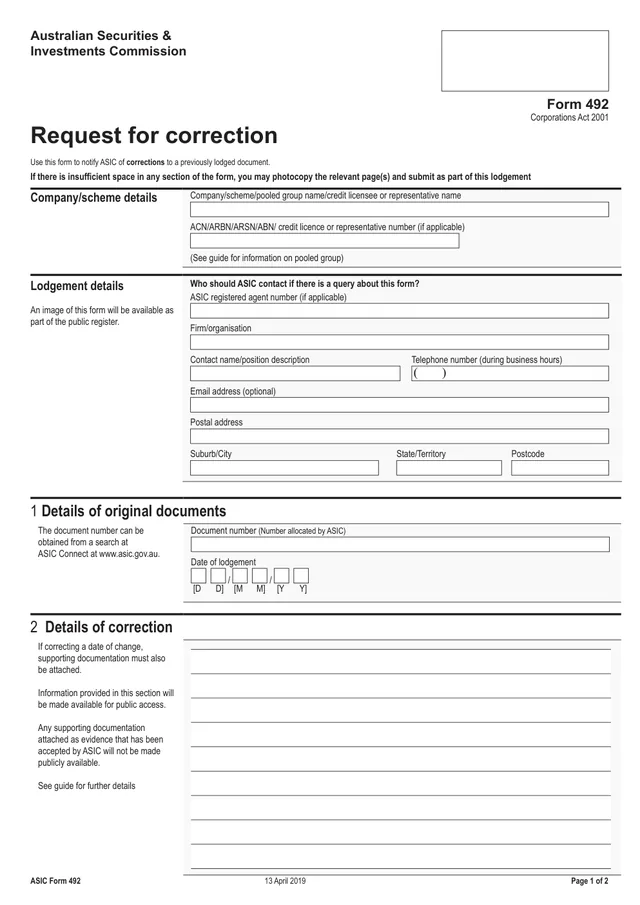
ASIC Form 492
13 April 2019
Request for correction
Corporations Act 2001
Company/scheme details
Company/scheme/pooled group name/credit licensee or representative name
ACN/ARBN/ARSN/ABN/ credit licence or representative number (if applicable)
(See guide for information on pooled group)
Lodgement details
An image of this form will be available as part of the public register.
Who should ASIC contact if there is a query about this form?
ASIC registered agent number (if applicable)
Firm/organisation
Contact name/position description
Telephone number (during business hours)
( )
Email address (optional)
Postal address
Suburb/City
State/Territory
Postcode
1 Details of original documents
The document number can be obtained from a search at
ASIC Connect at www.asic.gov.au.
Document number (Number allocated by ASIC)
Date of lodgement
/
/
[D
D]
[M
M]
[Y
Y]
2 Details of correction
If correcting a date of change, supporting documentation must also be attached.
Information provided in this section will be made available for public access.
Any supporting documentation attached as evidence that has been accepted by ASIC will not be made publicly available.
See guide for further details
If there is
How to fill it
Fill or edit this form in MePDF
- Preview page 1 to confirm the form name and revision.
- Select Fill form to answer the form one page at a time.
- Type an answer for each field; checkboxes and choices use the form’s own options.
- Preview the finished pages, then download the flattened PDF.
- The downloaded copy is image-only, so it cannot be edited as a form again.
Keep the tax year and filing status consistent on every page. The editor keeps the original layout while you fill the existing fields.