What's inside
Form content
Retailer:
Service Order:#
NMI:
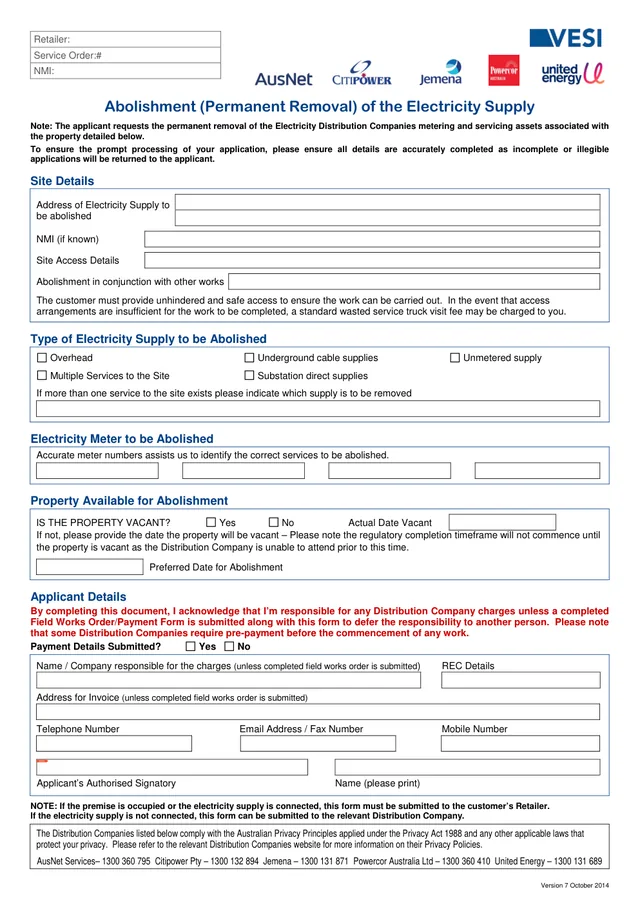
Abolishment (Permanent Removal) of the Electricity Supply
Note: The applicant requests the permanent removal of the Electricity Distribution Companies metering and servicing assets associated with the property detailed below.
To ensure the prompt processing of your application, please ensure all details are accurately completed as incomplete or illegible applications will be returned to the applicant.
Site Details
Address of Electricity Supply to be abolished
NMI (if known)
Site Access Details
Abolishment in conjunction with other works
The customer must provide unhindered and safe access to ensure the work can be carried out. In the event that access arrangements are insufficient for the work to be completed, a standard wasted service truck visit fee may be charged to you.
Type of Electricity Supply to be Abolished
Overhead
Underground cable supplies
Unmetered supply
Multiple Services to the Site
Substation direct supplies
If more than one service to the site exists please indicate which supply is to be removed
Electricity Meter to be Abolished
Accurate meter numbers assists us to identify the correct services to be abolished.
Property Available for
How to fill it
Fill or edit this form in MePDF
- Preview page 1 to confirm the form name and revision.
- Select Fill form to answer the form one page at a time.
- Type an answer for each field; checkboxes and choices use the form’s own options.
- Preview the finished pages, then download the flattened PDF.
- The downloaded copy is image-only, so it cannot be edited as a form again.
Keep the tax year and filing status consistent on every page. The editor keeps the original layout while you fill the existing fields.