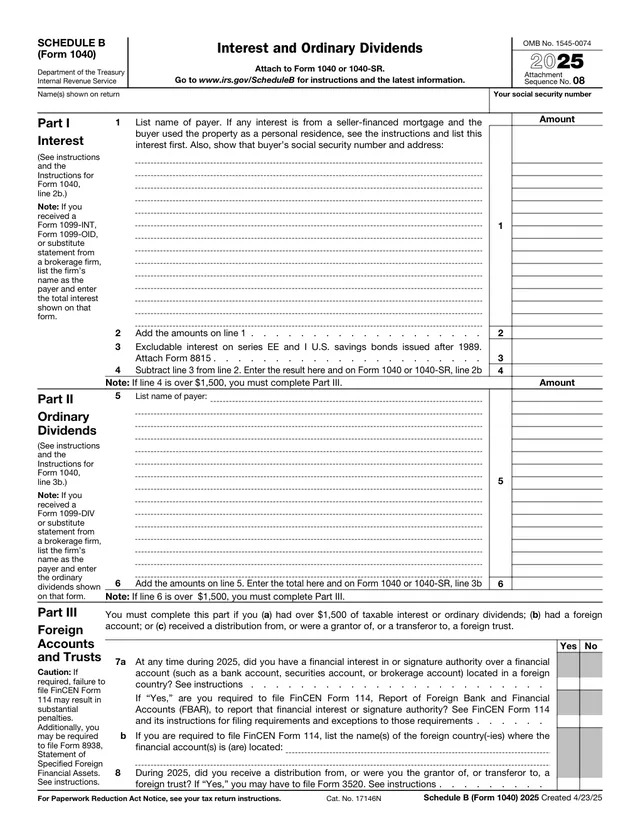
What's inside
Form content
(Form 1040)
2025
Interest and Ordinary Dividends
Attach to Form 1040 or 1040-SR.
Go to www.irs.gov/ScheduleB for instructions and the latest information.
Attachment
Sequence No. 08
Name(s) shown on return
Your social security number
Part I
Interest
(See instructions and the
Instructions for
Form 1040, line 2b.)
Note: If you received a
Form 1099-INT,
Form 1099-OID, or substitute statement from a brokerage firm, list the firm’s name as the payer and enter the total interest shown on that form.
1
List name of payer. If any interest is from a seller-financed mortgage and the buyer used the property as a personal residence, see the instructions and list this interest first. Also, show that buyer’s social security number and address:
Amount
1
2
Add the amounts on line 1 .
.
.
.
.
.
.
.
.
.
.
.
.
.
.
.
.
.
.
2
3
Excludable interest on series EE and I U.S. savings bonds issued after 1989.
Attach Form 8815 .
.
.
.
.
.
.
.
.
.
.
.
.
.
.
.
.
.
.
.
.
.
3
4
Subtract line 3 from line 2. Enter the result here and on Form 1040 or 1040-SR, line 2b
4
Note: If line 4 is over $1,500, you must complete Part III.
Part II
Ordinary
Dividends
(See instructions and the
Instructions for
Form 1040, line 3b.)
How to fill it
Fill or edit this form in MePDF
- Preview page 1 to confirm the form name and revision.
- Select Fill form to answer the form one page at a time.
- Type an answer for each field; checkboxes and choices use the form’s own options.
- Preview the finished pages, then download the flattened PDF.
- The downloaded copy is image-only, so it cannot be edited as a form again.
Copy figures exactly from the statement and keep the currency clear. The editor keeps the original layout while you fill the existing fields.