What's inside
Form content
(Form 1040)
Credit for the Elderly or the Disabled
Attach to Form 1040 or 1040-SR.
Go to www.irs.gov/ScheduleR for instructions and the latest information.
2025
Attachment
Sequence No. 16
Name(s) shown on return
Your social security number
You may be able to take this credit and reduce your tax if by the end of 2025:
• You were age 65 or older or
• You were under age 65, you retired on permanent and total disability, and you received taxable disability income.
But you must also meet other tests. See instructions.
TIP
In most cases, the IRS can figure the credit for you. See instructions.
Part I
Check the Box for Your Filing Status and Age
If your filing status is:
And by the end of 2025:
Check only one box:
Single,
Head of household, or
Qualifying surviving spouse
1 You were 65 or older .
.
.
.
.
.
.
.
.
.
.
.
.
.
.
.
.
.
.
.
1
2 You were under 65 and you retired on permanent and total disability
.
.
2
Married filing jointly
3 Both spouses were 65 or older .
.
.
.
.
.
.
.
.
.
.
.
.
.
.
.
.
3
4 Both spouses were under 65, but only one spouse retired on permanent and total disability .
.
.
.
.
.
.
.
.
.
.
.
.
.
.
.
.
.
.
.
.
.
.
4
5 Both spouses were under 65, and both retired on per
How to fill it
Fill or edit this form in MePDF
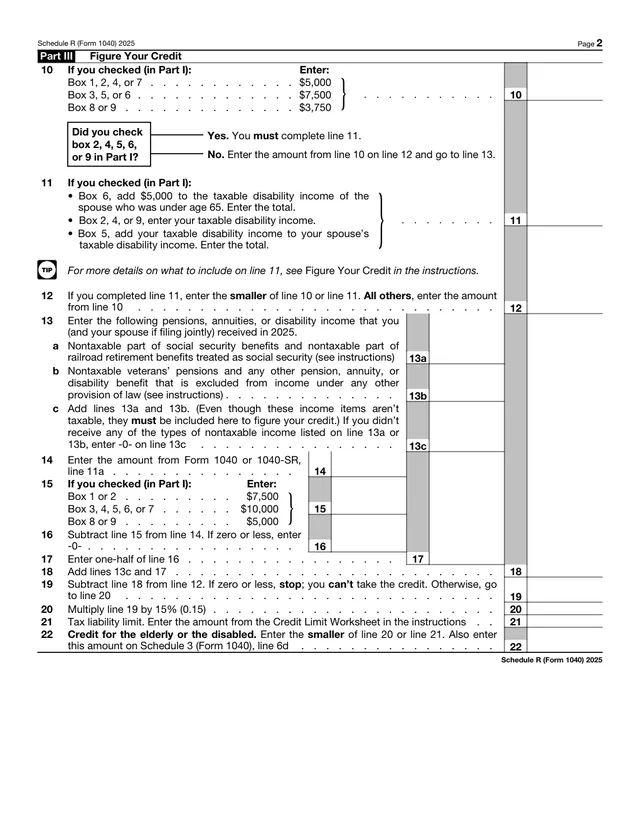
- Preview page 2 to confirm the form name and revision.
- Select Fill form to answer the form one page at a time.
- Type an answer for each field; checkboxes and choices use the form’s own options.
- Preview the finished pages, then download the flattened PDF.
- The downloaded copy is image-only, so it cannot be edited as a form again.
Fill only the fields that apply and keep a copy of the finished PDF. The editor keeps the original layout while you fill the existing fields.