What's inside
Form content
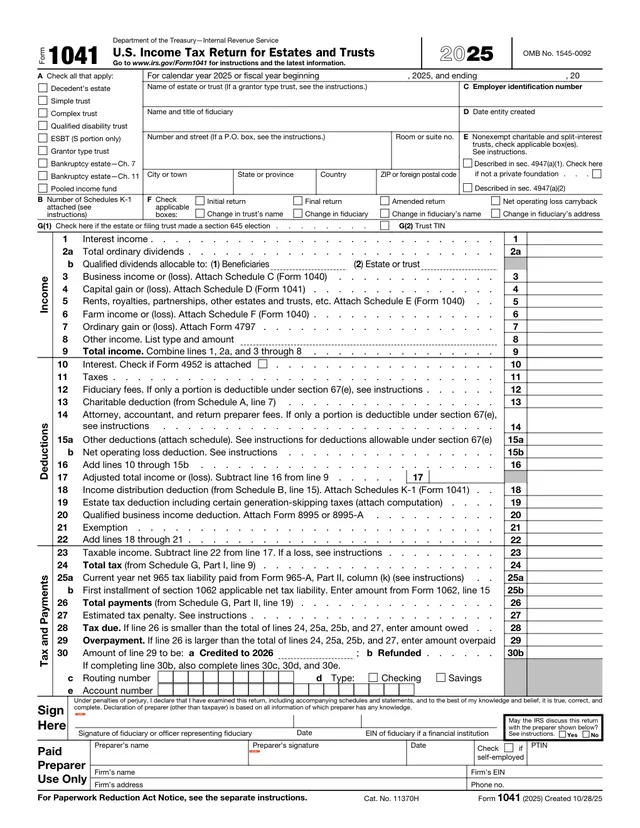
Form
1041
U.S. Income Tax Return for Estates and Trusts
Go to www.irs.gov/Form1041 for instructions and the latest information.
2025
For calendar year 2025 or fiscal year beginning
, 2025, and ending
, 20
Name of estate or trust (If a grantor type trust, see the instructions.)
Name and title of fiduciary
Number and street (If a P.O. box, see the instructions.)
Room or suite no.
City or town
State or province
Country
ZIP or foreign postal code
A Check all that apply:
Decedent’s estate
Simple trust
Complex trust
Qualified disability trust
ESBT (S portion only)
Grantor type trust
Bankruptcy estate—Ch. 7
Bankruptcy estate—Ch. 11
Pooled income fund
B Number of Schedules K-1 attached (see instructions)
C Employer identification number
D Date entity created
E Nonexempt charitable and split-interest trusts, check applicable box(es).
See instructions.
Described in sec. 4947(a)(1). Check here if not a private foundation .
.
.
Described in sec. 4947(a)(2)
F Check applicable boxes:
Initial return
Final return
Amended return
Net operating loss carryback
Change in trust’s name
Change in fiduciary
Change in fiduciary’s name
Change in fiduciary’s address
G(1) Check here if the estate or filing tru
How to fill it
Fill or edit this form in MePDF
- Preview page 1 to confirm the form name and revision.
- Select Fill form to answer the form one page at a time.
- Type an answer for each field; checkboxes and choices use the form’s own options.
- Preview the finished pages, then download the flattened PDF.
- The downloaded copy is image-only, so it cannot be edited as a form again.
Keep the tax year and filing status consistent on every page. The editor keeps the original layout while you fill the existing fields.