What's inside
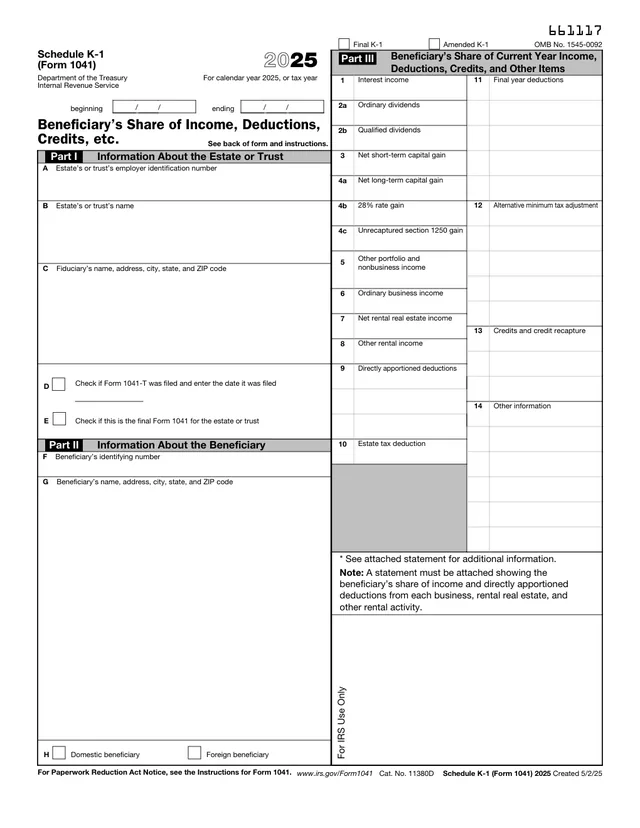
Form content
(Form 1041)
2025
Beneficiary’s Share of Income, Deductions,
Credits, etc.
See back of form and instructions.
661117
Final K-1
Amended K-1
For calendar year 2025, or tax year beginning
/
/ ending
/
/
Information About the Estate or Trust
Part I
A Estate’s or trust’s employer identification number
B Estate’s or trust’s name
C Fiduciary’s name, address, city, state, and ZIP code
D
Check if Form 1041-T was filed and enter the date it was filed
E
Check if this is the final Form 1041 for the estate or trust
Information About the Beneficiary
Part II
F Beneficiary’s identifying number
G Beneficiary’s name, address, city, state, and ZIP code
H
Domestic beneficiary
Foreign beneficiary
Beneficiary’s Share of Current Year Income,
Deductions, Credits, and Other Items
Part III
1
Interest income
2a
Ordinary dividends
2b
Qualified dividends
3
Net short-term capital gain
4a
Net long-term capital gain
4b
28% rate gain
4c
Unrecaptured section 1250 gain
5
Other portfolio and nonbusiness income
6
Ordinary business income
7
Net rental real estate income
8
Other rental income
9
Directly apportioned deductions
10
Estate tax deduction
11
Final year deductions
12
Alternative minimum tax adjustment
13
Credit
How to fill it
Fill or edit this form in MePDF
- Preview page 1 to confirm the form name and revision.
- Select Fill form to answer the form one page at a time.
- Type an answer for each field; checkboxes and choices use the form’s own options.
- Preview the finished pages, then download the flattened PDF.
- The downloaded copy is image-only, so it cannot be edited as a form again.
Keep the tax year and filing status consistent on every page. The editor keeps the original layout while you fill the existing fields.