What's inside
Form content
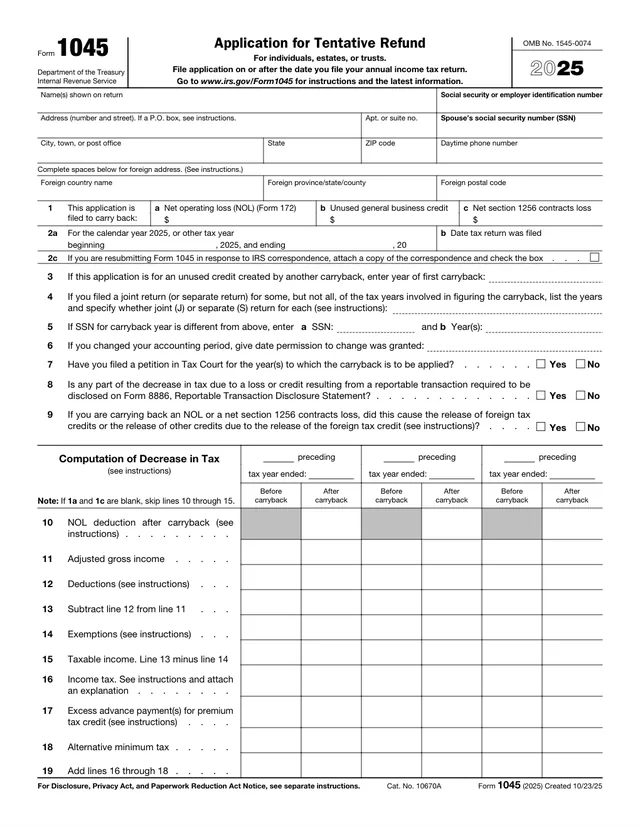
Application for Tentative Refund
For individuals, estates, or trusts.
File application on or after the date you file your annual income tax return.
Go to www.irs.gov/Form1045 for instructions and the latest information.
2025
Name(s) shown on return
Social security or employer identification number
Complete spaces below for foreign address. (See instructions.)
Address (number and street). If a P.O. box, see instructions.
Apt. or suite no.
Spouse’s social security number (SSN)
City, town, or post office
State
ZIP code
Daytime phone number
Foreign country name
Foreign province/state/county
Foreign postal code
1
This application is filed to carry back:
a Net operating loss (NOL) (Form 172)
$ b Unused general business credit
$ c Net section 1256 contracts loss
$
2a
For the calendar year 2025, or other tax year beginning
, 2025, and ending
, 20 b Date tax return was filed
2c
If you are resubmitting Form 1045 in response to IRS correspondence, attach a copy of the correspondence and check the box .
.
.
3
If this application is for an unused credit created by another carryback, enter year of first carryback:
4
If you filed a joint return (or separate return) for some, but not all, of the t
How to fill it
Fill or edit this form in MePDF
- Preview page 1 to confirm the form name and revision.
- Select Fill form to answer the form one page at a time.
- Type an answer for each field; checkboxes and choices use the form’s own options.
- Preview the finished pages, then download the flattened PDF.
- The downloaded copy is image-only, so it cannot be edited as a form again.
Keep the tax year and filing status consistent on every page. The editor keeps the original layout while you fill the existing fields.