What's inside
Form content
Attention filers of Form 1096:
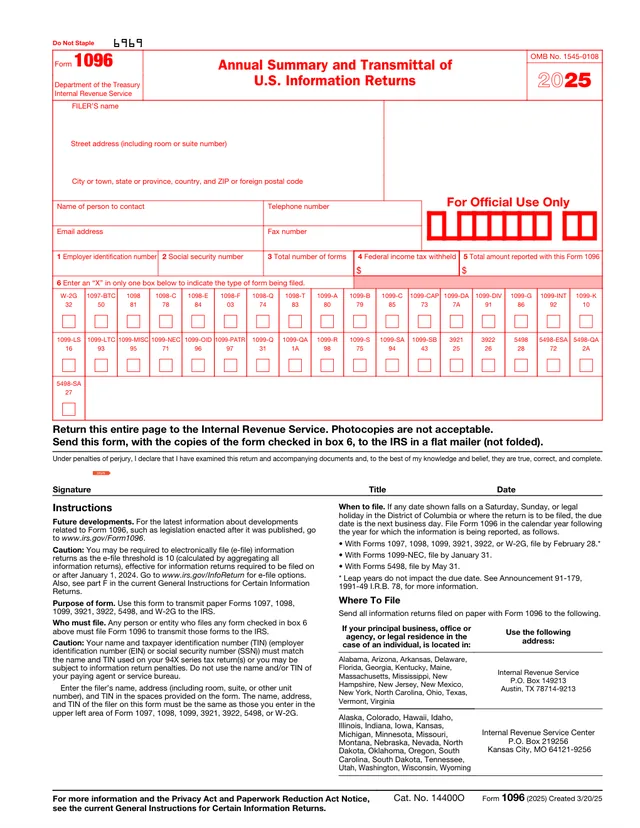
This form is provided for informational purposes only. It appears in red, similar to the official
IRS form. The official printed version of this IRS form is scannable, but a copy, printed from this website, is not. Do not print and file a Form 1096 downloaded from this website; a penalty may be imposed for filing with the IRS information return forms that can’t be scanned. See part O in the current General Instructions for Certain Information Returns, available at www.irs.gov/form1099, for more information about penalties.
To order official IRS information returns, which include a scannable Form 1096 for filing with the IRS, visit www.IRS.gov/orderforms. Click on Employer and Information Returns, and we’ll mail you the forms you request and their instructions, as well as any publications you may order.
Information returns may also be filed electronically. To file electronically, you must have software, or a service provider, that will create the file in the proper format. More information can be found at:
• IRS Filing Information Returns Electronically (FIRE) system (visit www.IRS.gov/FIRE), or
• IRS Affordable Care Act Information Returns (AIR) progr
How to fill it
Fill or edit this form in MePDF
- Preview page 2 to confirm the form name and revision.
- Select Fill form to answer the form one page at a time.
- Type an answer for each field; checkboxes and choices use the form’s own options.
- Preview the finished pages, then download the flattened PDF.
- The downloaded copy is image-only, so it cannot be edited as a form again.
Keep the tax year and filing status consistent on every page. The editor keeps the original layout while you fill the existing fields.