What's inside
Form content
Cat. No. 54293T
Bond
Tax
Credit
Copy A
For
Internal Revenue
Service Center
For filing information,
Privacy Act, and
Paperwork Reduction
Act Notice, see the
General Instructions for Certain
Information Returns.
www.irs.gov/Form1099
For calendar year
5050
VOID
CORRECTED
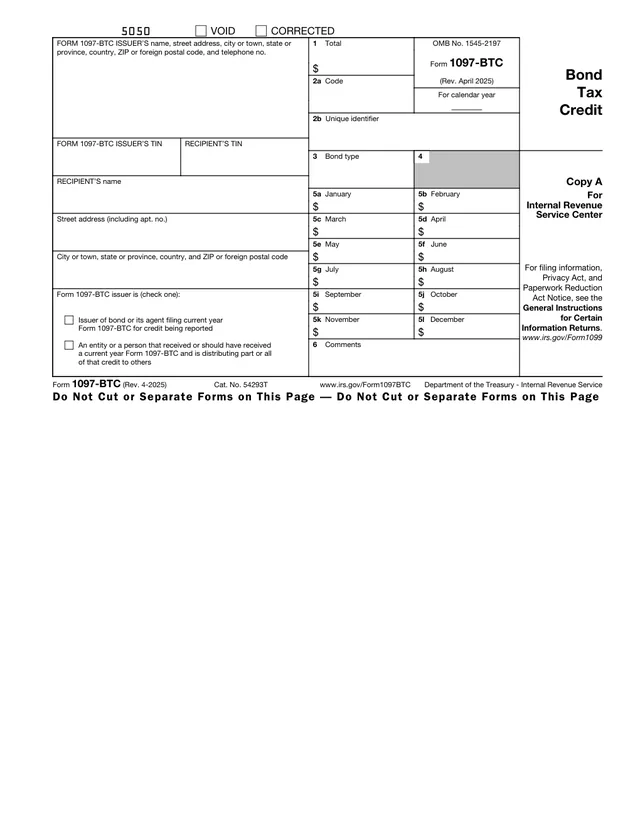
FORM 1097-BTC ISSUER’S name, street address, city or town, state or province, country, ZIP or foreign postal code, and telephone no.
FORM 1097-BTC ISSUER’S TIN
RECIPIENT’S TIN
RECIPIENT’S name
Street address (including apt. no.)
City or town, state or province, country, and ZIP or foreign postal code
Form 1097-BTC issuer is (check one):
Issuer of bond or its agent filing current year
Form 1097-BTC for credit being reported
An entity or a person that received or should have received a current year Form 1097-BTC and is distributing part or all of that credit to others
1 Total
$
2a Code
2b Unique identifier
3 Bond type
4
5a January
$
5b February
$
5c March
$
5d April
$
5e May
$
5f June
$
5g July
$
5h August
$
5i September
$
5j October
$
5k November
$
5l December
$
6 Comments
(Rev. April 2025)
Form 1097-BTC (Rev. 4-2025) www.irs.gov/Form1097BTC
Do Not Cut or Separate Forms on This Page — Do Not Cut or Separate Forms on Th
How to fill it
Fill or edit this form in MePDF
- Preview page 1 to confirm the form name and revision.
- Select Fill form to answer the form one page at a time.
- Type an answer for each field; checkboxes and choices use the form’s own options.
- Preview the finished pages, then download the flattened PDF.
- The downloaded copy is image-only, so it cannot be edited as a form again.
Copy figures exactly from the statement and keep the currency clear. The editor keeps the original layout while you fill the existing fields.