What's inside
Form content
(Rev. December 2017)
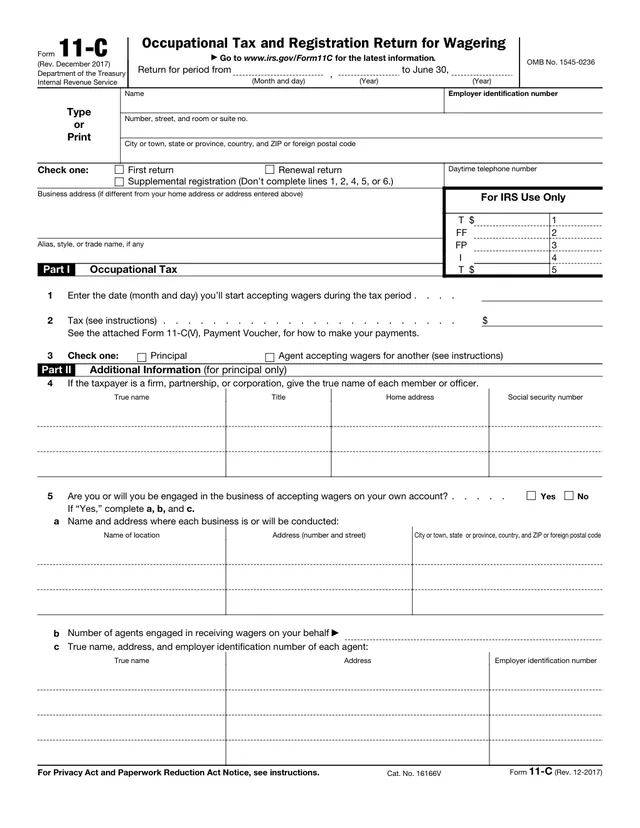
Occupational Tax and Registration Return for Wagering
▶ Go to www.irs.gov/Form11C for the latest information.
Return for period from
(Month and day)
,
(Year) to June 30,
(Year)
Type or
Print
Name
Employer identification number
Number, street, and room or suite no.
City or town, state or province, country, and ZIP or foreign postal code
Check one:
First return
Renewal return
Supplemental registration (Don’t complete lines 1, 2, 4, 5, or 6.)
Daytime telephone number
Business address (if different from your home address or address entered above)
Alias, style, or trade name, if any
For IRS Use Only
T $
1
FF
2
FP
3
I
4
T $
5
Part I
Occupational Tax
1
Enter the date (month and day) you’ll start accepting wagers during the tax period .
.
.
.
2
Tax (see instructions) .
.
.
.
.
.
.
.
.
.
.
.
.
.
.
.
.
.
.
.
.
.
.
.
$
See the attached Form 11-C(V), Payment Voucher, for how to make your payments.
3
Check one:
Principal
Agent accepting wagers for another (see instructions)
Part II
Additional Information (for principal only)
4
If the taxpayer is a firm, partnership, or corporation, give the true name of each member or officer.
True name
Title
Home address
Social security nu
How to fill it
Fill or edit this form in MePDF
- Preview page 1 to confirm the form name and revision.
- Select Fill form to answer the form one page at a time.
- Type an answer for each field; checkboxes and choices use the form’s own options.
- Preview the finished pages, then download the flattened PDF.
- The downloaded copy is image-only, so it cannot be edited as a form again.
Keep the tax year and filing status consistent on every page. The editor keeps the original layout while you fill the existing fields.