What's inside
Form content
U.S. Income Tax Return for Real Estate Investment Trusts
For calendar year 2025 or tax year beginning
, 2025, ending
, 20
Go to www.irs.gov/Form1120REIT for instructions and the latest information.
2025
Name
Number and street (If a P.O. box, see instructions.)
Room or suite no.
City or town
State
ZIP code
A Year of REIT status election
B Check if a:
1 REIT with 100% owned subsidiaries
(see instructions)
2 Personal holding co.
(attach Sch. PH)
C Employer identification number
D Date REIT established
E Total assets (see instructions)
$
F
Check applicable box(es):
(1)
Final return (2)
Name change
(3)
Address change
(4)
Amended return
G
Identify the type of REIT (see instructions):
(1)
Equity REIT
(2)
Mortgage REIT
H PBA code (see instructions)
Part I—Real Estate Investment Trust Taxable Income (see instructions)
Income (EXCLUDING income required to be reported in Part II or Part IV)
1
Dividends .
.
.
.
.
.
.
.
.
.
.
.
.
.
.
.
.
.
.
.
.
.
.
.
.
.
.
.
.
.
1
2
Interest
.
.
.
.
.
.
.
.
.
.
.
.
.
.
.
.
.
.
.
.
.
.
.
.
.
.
.
.
.
.
2
3
Gross rents from real property .
.
.
.
.
.
.
.
.
.
.
.
.
.
.
.
.
.
.
.
.
.
.
3
4
Other gross rents .
.
.
.
.
.
.
.
.
.
.
.
.
.
.
.
.
.
.
.
.
.
.
.
.
.
.
4
5
C
How to fill it
Fill or edit this form in MePDF
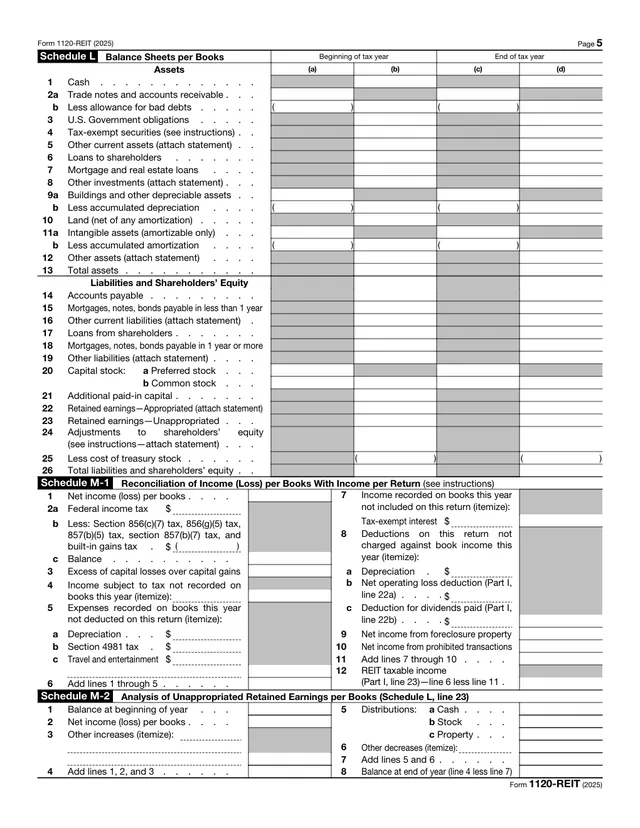
- Preview page 5 to confirm the form name and revision.
- Select Fill form to answer the form one page at a time.
- Type an answer for each field; checkboxes and choices use the form’s own options.
- Preview the finished pages, then download the flattened PDF.
- The downloaded copy is image-only, so it cannot be edited as a form again.
Keep the tax year and filing status consistent on every page. The editor keeps the original layout while you fill the existing fields.