What's inside
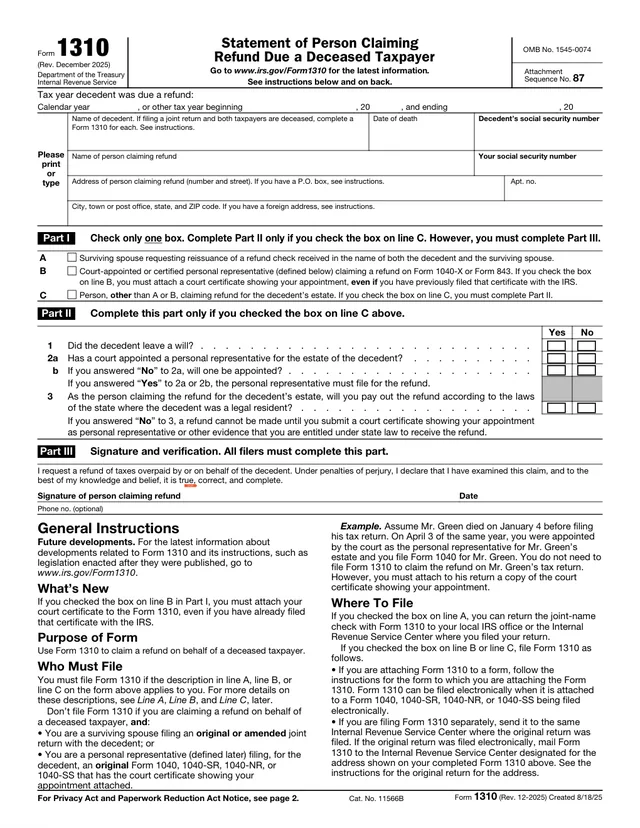
Form content
(Rev. December 2025)
Statement of Person Claiming
Refund Due a Deceased Taxpayer
Go to www.irs.gov/Form1310 for the latest information.
See instructions below and on back.
Attachment
Sequence No. 87
Tax year decedent was due a refund:
Calendar year
, or other tax year beginning
, 20
, and ending
, 20
Please print or type
Name of decedent. If filing a joint return and both taxpayers are deceased, complete a
Form 1310 for each. See instructions.
Date of death
Decedent’s social security number
Name of person claiming refund
Your social security number
Address of person claiming refund (number and street). If you have a P.O. box, see instructions.
Apt. no.
City, town or post office, state, and ZIP code. If you have a foreign address, see instructions.
Part I
Check only one box. Complete Part II only if you check the box on line C. However, you must complete Part III.
A
Surviving spouse requesting reissuance of a refund check received in the name of both the decedent and the surviving spouse.
B
Court-appointed or certified personal representative (defined below) claiming a refund on Form 1040-X or Form 843. If you check the box on line B, you must attach a court certificate showing your
How to fill it
Fill or edit this form in MePDF
- Preview page 1 to confirm the form name and revision.
- Select Fill form to answer the form one page at a time.
- Type an answer for each field; checkboxes and choices use the form’s own options.
- Preview the finished pages, then download the flattened PDF.
- The downloaded copy is image-only, so it cannot be edited as a form again.
Keep the tax year and filing status consistent on every page. The editor keeps the original layout while you fill the existing fields.