What's inside
Form content
88
REVENUE USE ONLY. DO NOT MARK IN THIS AREA.
81 PM
80 RCVD
Enter the number claimed. Do not check
DO NOT STAPLE ANY ITEMS TO THE RETURN.
ADOR 10573 (24)
Form 140X (2024)
FILING STATUS
RESIDENCY
OR FISCAL YEAR BEGINNING M M D D 2 0 2 4 AND ENDING M M D D Y Y Y Y . 66
Your First Name and Middle Initial
Last Name
Your Social Security Number
Spouse’s First Name and Middle Initial (if box 4 or 6 checked)
Last Name
Spouse’s Social Security No.
Current Home Address - number and street, rural route
Apt. No.
Daytime Phone (with area code)
City, Town or Post Office
State
ZIP Code
Last Names Used in Last Four Prior Year(s) (if different)
1
1
2
94
3
97
Enter your
SSN(s).
EXEMPTIONS
Place any required federal and AZ schedules or other documents after Form 140X.
00
00
Arizona Form
140X
Individual Amended Income Tax Return
For Forms 140, 140A, 140EZ, 140NR and 140PY
FOR CALENDAR YEAR
2024
Check a box to indicate both filing and residency status:
4 Married filing joint return 4a Injured Spouse Protection of Joint Overpayment
5 Head of household: Enter name of qualifying child or dependent on next line:
6 Married filing separate return: Enter spouse’s name and Social Security Number abo
How to fill it
Fill or edit this form in MePDF
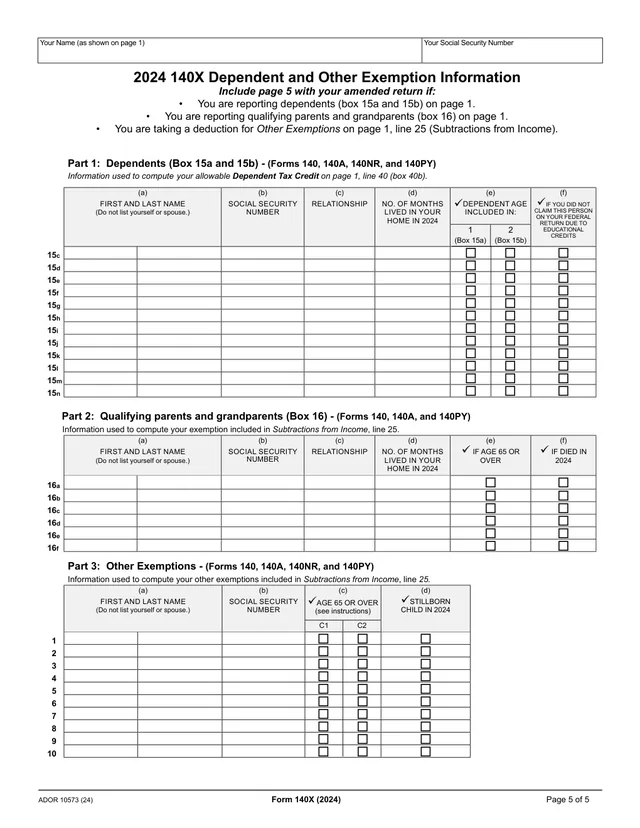
- Preview page 5 to confirm the form name and revision.
- Select Fill form to answer the form one page at a time.
- Type an answer for each field; checkboxes and choices use the form’s own options.
- Preview the finished pages, then download the flattened PDF.
- The downloaded copy is image-only, so it cannot be edited as a form again.
Keep the tax year and filing status consistent on every page. The editor keeps the original layout while you fill the existing fields.