What's inside
Form content
Catalog Number 55242M www.irs.gov
Form 14157 (Rev. 6-2018)
(June 2018)
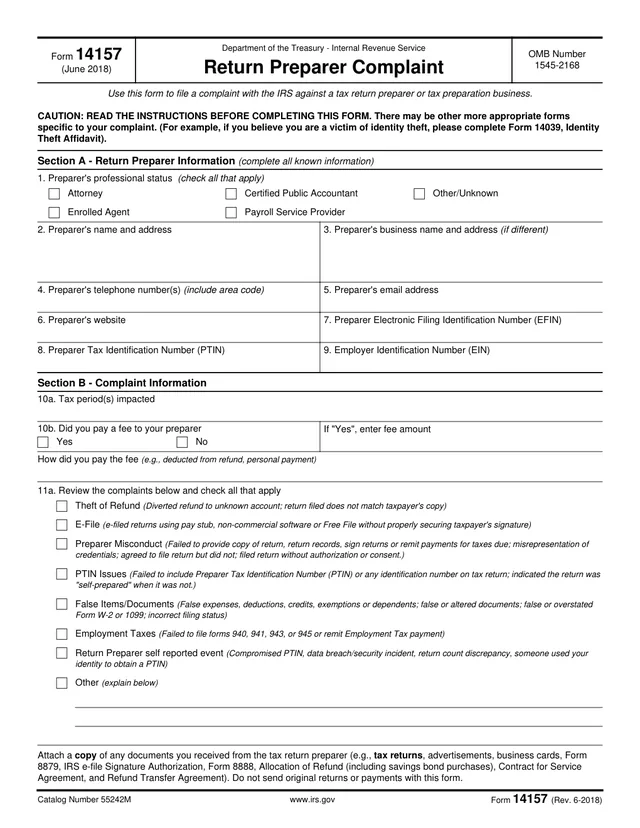
Return Preparer Complaint
OMB Number
1545-2168
Use this form to file a complaint with the IRS against a tax return preparer or tax preparation business.
CAUTION: READ THE INSTRUCTIONS BEFORE COMPLETING THIS FORM. There may be other more appropriate forms specific to your complaint. (For example, if you believe you are a victim of identity theft, please complete Form 14039, Identity
Theft Affidavit).
Section A - Return Preparer Information (complete all known information)
1. Preparer's professional status (check all that apply)
Attorney
Enrolled Agent
Certified Public Accountant
Other/Unknown
Payroll Service Provider
2. Preparer's name and address
3. Preparer's business name and address (if different)
4. Preparer's telephone number(s) (include area code)
5. Preparer's email address
6. Preparer's website
7. Preparer Electronic Filing Identification Number (EFIN)
8. Preparer Tax Identification Number (PTIN)
9. Employer Identification Number (EIN)
Section B - Complaint Information
10a. Tax period(s) impacted
11a. Review the complaints below and check all that apply
Theft of Refund (Diverted refund to unknown account
How to fill it
Fill or edit this form in MePDF
- Preview page 1 to confirm the form name and revision.
- Select Fill form to answer the form one page at a time.
- Type an answer for each field; checkboxes and choices use the form’s own options.
- Preview the finished pages, then download the flattened PDF.
- The downloaded copy is image-only, so it cannot be edited as a form again.
Keep the tax year and filing status consistent on every page. The editor keeps the original layout while you fill the existing fields.