What's inside
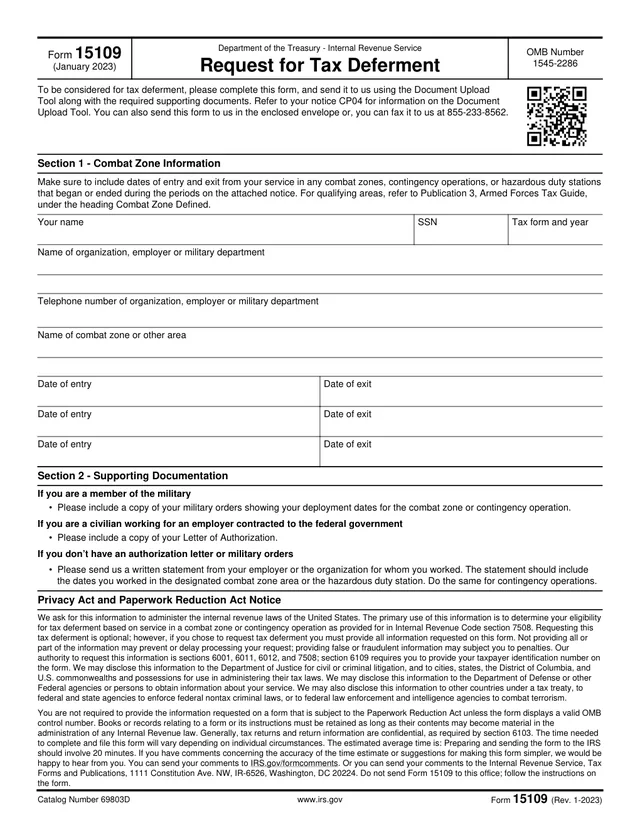
Form content
Catalog Number 69803D www.irs.gov
Form 15109 (Rev. 1-2023)
(January 2023)
Request for Tax Deferment
OMB Number
1545-2286
To be considered for tax deferment, please complete this form, and send it to us using the Document Upload
Tool along with the required supporting documents. Refer to your notice CP04 for information on the Document
Upload Tool. You can also send this form to us in the enclosed envelope or, you can fax it to us at 855-233-8562.
Section 1 - Combat Zone Information
Make sure to include dates of entry and exit from your service in any combat zones, contingency operations, or hazardous duty stations that began or ended during the periods on the attached notice. For qualifying areas, refer to Publication 3, Armed Forces Tax Guide, under the heading Combat Zone Defined.
Your name
SSN
Tax form and year
Name of organization, employer or military department
Telephone number of organization, employer or military department
Name of combat zone or other area
Date of entry
Date of exit
Date of entry
Date of exit
Date of entry
Date of exit
Section 2 - Supporting Documentation
If you are a member of the military
• Please include a copy of your military orders showing your deplo
How to fill it
Fill or edit this form in MePDF
- Preview page 1 to confirm the form name and revision.
- Select Fill form to answer the form one page at a time.
- Type an answer for each field; checkboxes and choices use the form’s own options.
- Preview the finished pages, then download the flattened PDF.
- The downloaded copy is image-only, so it cannot be edited as a form again.
Keep the tax year and filing status consistent on every page. The editor keeps the original layout while you fill the existing fields.