What's inside
Form content
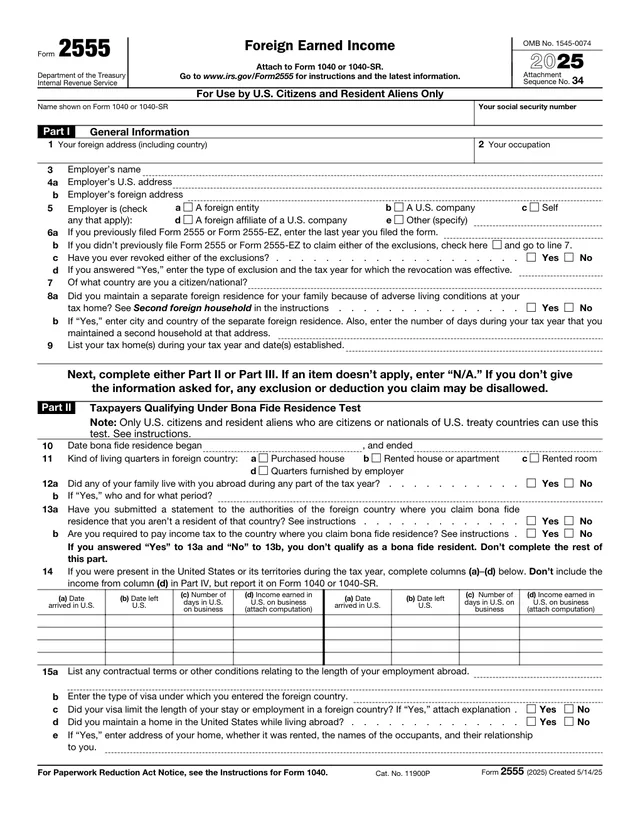
Foreign Earned Income
Attach to Form 1040 or 1040-SR.
Go to www.irs.gov/Form2555 for instructions and the latest information.
2025
Attachment
Sequence No. 34
For Use by U.S. Citizens and Resident Aliens Only
Name shown on Form 1040 or 1040-SR
Your social security number
Part I
General Information
1 Your foreign address (including country)
2 Your occupation
3
Employer’s name
4 a
Employer’s U.S. address b Employer’s foreign address
5
Employer is (check any that apply):
a
A foreign entity b
A U.S. company c
Self d
A foreign affiliate of a U.S. company e
Other (specify)
6 a
If you previously filed Form 2555 or Form 2555-EZ, enter the last year you filed the form.
b If you didn’t previously file Form 2555 or Form 2555-EZ to claim either of the exclusions, check here and go to line 7.
c Have you ever revoked either of the exclusions? .
.
.
.
.
.
.
.
.
.
.
.
.
.
.
.
.
.
.
.
Yes
No d If you answered “Yes,” enter the type of exclusion and the tax year for which the revocation was effective.
7
Of what country are you a citizen/national?
8a
Did you maintain a separate foreign residence for your family because of adverse living conditions at your tax home? See Second foreign household in the i
How to fill it
Fill or edit this form in MePDF
- Preview page 1 to confirm the form name and revision.
- Select Fill form to answer the form one page at a time.
- Type an answer for each field; checkboxes and choices use the form’s own options.
- Preview the finished pages, then download the flattened PDF.
- The downloaded copy is image-only, so it cannot be edited as a form again.
Keep the tax year and filing status consistent on every page. The editor keeps the original layout while you fill the existing fields.