What's inside
Form content
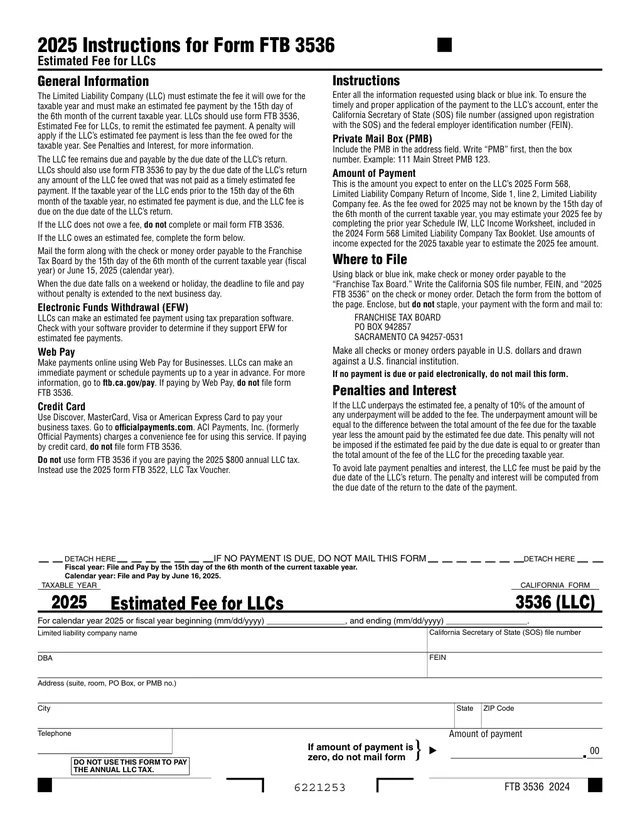
2025 Instructions for Form FTB 3536
Estimated Fee for LLCs
General Information
The Limited Liability Company (LLC) must estimate the fee it will owe for the taxable year and must make an estimated fee payment by the 15th day of the 6th month of the current taxable year. LLCs should use form FTB 3536,
Estimated Fee for LLCs, to remit the estimated fee payment. A penalty will apply if the LLC’s estimated fee payment is less than the fee owed for the taxable year. See Penalties and Interest, for more information.
The LLC fee remains due and payable by the due date of the LLC’s return.
LLCs should also use form FTB 3536 to pay by the due date of the LLC’s return any amount of the LLC fee owed that was not paid as a timely estimated fee payment. If the taxable year of the LLC ends prior to the 15th day of the 6th month of the taxable year, no estimated fee payment is due, and the LLC fee is due on the due date of the LLC’s return.
If the LLC does not owe a fee, do not complete or mail form FTB 3536.
If the LLC owes an estimated fee, complete the form below.
Mail the form along with the check or money order payable to the Franchise
Tax Board by the 15th day of the 6th month of the curren
How to fill it
Fill or edit this form in MePDF
- Preview page 1 to confirm the form name and revision.
- Select Fill form to answer the form one page at a time.
- Type an answer for each field; checkboxes and choices use the form’s own options.
- Preview the finished pages, then download the flattened PDF.
- The downloaded copy is image-only, so it cannot be edited as a form again.
Keep the tax year and filing status consistent on every page. The editor keeps the original layout while you fill the existing fields.