What's inside
Form content
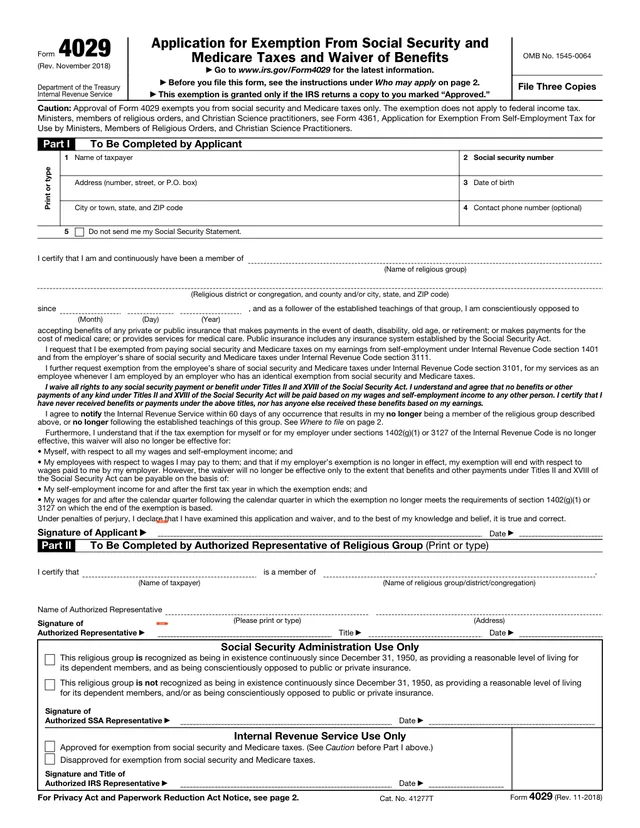
Application for Exemption From Social Security and
Medicare Taxes and Waiver of Benefits
(Rev. November 2018)
▶ Go to www.irs.gov/Form4029 for the latest information.
▶ Before you file this form, see the instructions under Who may apply on page 2.
▶ This exemption is granted only if the IRS returns a copy to you marked “Approved.”
File Three Copies
Caution: Approval of Form 4029 exempts you from social security and Medicare taxes only. The exemption does not apply to federal income tax.
Ministers, members of religious orders, and Christian Science practitioners, see Form 4361, Application for Exemption From Self-Employment Tax for
Use by Ministers, Members of Religious Orders, and Christian Science Practitioners.
Part I
To Be Completed by Applicant
Print or type
1 Name of taxpayer
Address (number, street, or P.O. box)
City or town, state, and ZIP code
2 Social security number
3 Date of birth
4 Contact phone number (optional)
5
Do not send me my Social Security Statement.
I certify that I am and continuously have been a member of
(Name of religious group)
(Religious district or congregation, and county and/or city, state, and ZIP code) since
(Month)
(Day)
(Year)
, and as a follower
How to fill it
Fill or edit this form in MePDF
- Preview page 1 to confirm the form name and revision.
- Select Fill form to answer the form one page at a time.
- Type an answer for each field; checkboxes and choices use the form’s own options.
- Preview the finished pages, then download the flattened PDF.
- The downloaded copy is image-only, so it cannot be edited as a form again.
Keep the tax year and filing status consistent on every page. The editor keeps the original layout while you fill the existing fields.