What's inside
Form content
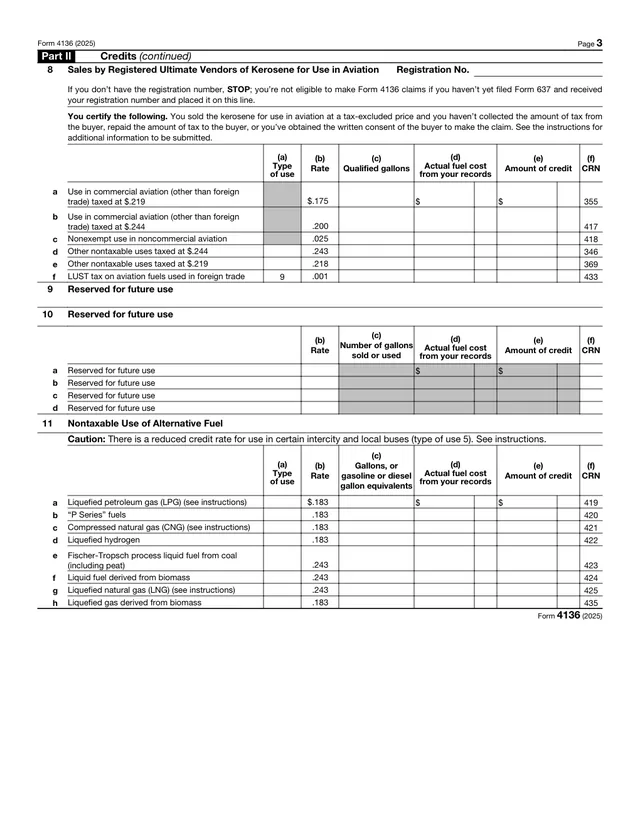
Credit for Federal Tax Paid on Fuels
Go to www.irs.gov/Form4136 for instructions and the latest information.
2025
Attachment
Sequence No. 79
Name (as shown on your income tax return)
Taxpayer identification number
Caution:
You must have owned or operated a business and conducted a qualifying business activity with qualifying use of qualifying fuels, and meet other requirements to have qualified gallons that are eligible for the credit for federal tax paid on fuels (fuel tax credit) (see instructions for exemption).
The person(s) signing the return with which this form is filed are declaring, under penalty of perjury, that the return and accompanying schedules, statements, and any other attachments are true, correct, and complete to the best of the signer’s knowledge and belief.
That declaration includes all amounts reported and all credits claimed on this form. It also includes certifying that all the statements for certain lines below are true as well.
You have the name and address of the person who sold the fuel to you and the dates of purchase. For claims on lines 1c and 2b (type of use 13 or 14), 3d, 4c, and 5, you haven’t waived the right to make the claim. For claims on lines
How to fill it
Fill or edit this form in MePDF
- Preview page 3 to confirm the form name and revision.
- Select Fill form to answer the form one page at a time.
- Type an answer for each field; checkboxes and choices use the form’s own options.
- Preview the finished pages, then download the flattened PDF.
- The downloaded copy is image-only, so it cannot be edited as a form again.
Keep the tax year and filing status consistent on every page. The editor keeps the original layout while you fill the existing fields.