What's inside
Form content
Catalog Number 16644M www.irs.gov
Form 433-D (Rev. 7-2024)
Part 1 — IRS Copy
(July 2024)
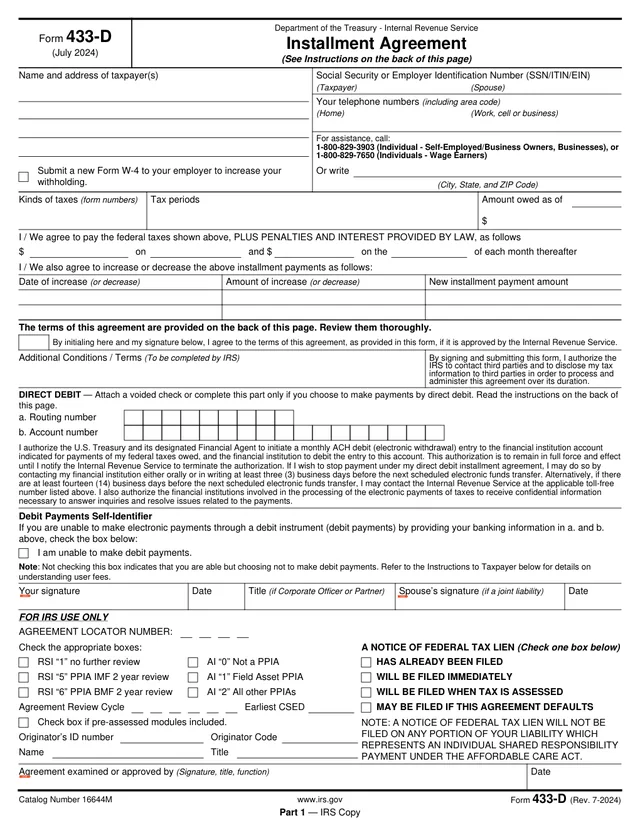
Installment Agreement
(See Instructions on the back of this page)
Name and address of taxpayer(s)
Submit a new Form W-4 to your employer to increase your withholding.
Social Security or Employer Identification Number (SSN/ITIN/EIN)
(Taxpayer)
(Spouse)
Your telephone numbers (including area code)
(Home)
(Work, cell or business)
For assistance, call:
1-800-829-3903 (Individual - Self-Employed/Business Owners, Businesses), or
1-800-829-7650 (Individuals - Wage Earners)
Or write
(City, State, and ZIP Code)
Kinds of taxes (form numbers)
Tax periods
Amount owed as of
$
I / We agree to pay the federal taxes shown above, PLUS PENALTIES AND INTEREST PROVIDED BY LAW, as follows
$ on and $ on the of each month thereafter
I / We also agree to increase or decrease the above installment payments as follows:
Date of increase (or decrease)
Amount of increase (or decrease)
New installment payment amount
The terms of this agreement are provided on the back of this page. Review them thoroughly.
By initialing here and my signature below, I agree to the terms of this agreement, as provided in this form, if it is ap
How to fill it
Fill or edit this form in MePDF
- Preview page 1 to confirm the form name and revision.
- Select Fill form to answer the form one page at a time.
- Type an answer for each field; checkboxes and choices use the form’s own options.
- Preview the finished pages, then download the flattened PDF.
- The downloaded copy is image-only, so it cannot be edited as a form again.
Keep the tax year and filing status consistent on every page. The editor keeps the original layout while you fill the existing fields.