What's inside
Form content
Catalog Number 72627P www.irs.gov
Form 4506-C (Rev. 10-2022)
(October 2022)
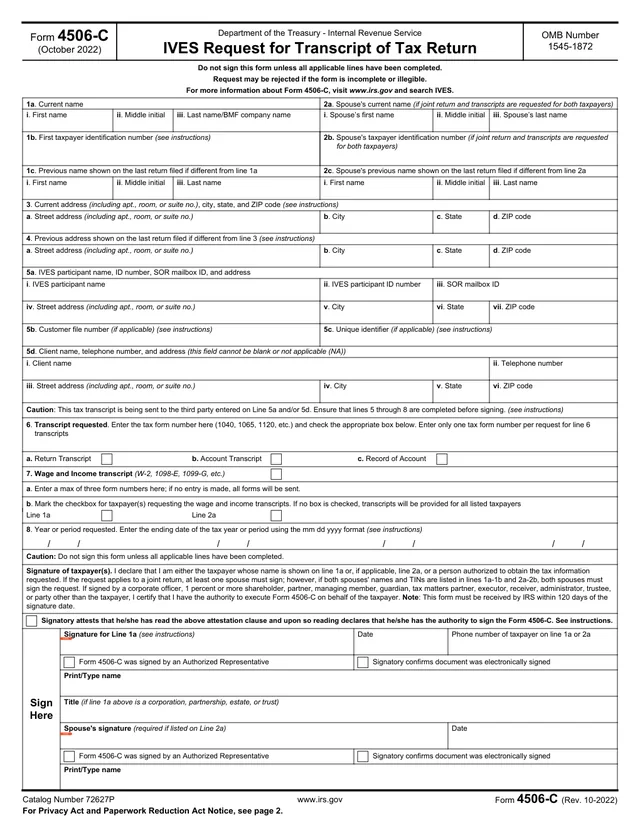
IVES Request for Transcript of Tax Return
OMB Number
1545-1872
Do not sign this form unless all applicable lines have been completed.
Request may be rejected if the form is incomplete or illegible.
For more information about Form 4506-C, visit www.irs.gov and search IVES.
1a. Current name i. First name ii. Middle initial iii. Last name/BMF company name
1b. First taxpayer identification number (see instructions)
1c. Previous name shown on the last return filed if different from line 1a i. First name ii. Middle initial iii. Last name
2a. Spouse's current name (if joint return and transcripts are requested for both taxpayers) i. Spouse’s first name ii. Middle initial iii. Spouse’s last name
2b. Spouse's taxpayer identification number (if joint return and transcripts are requested for both taxpayers)
2c. Spouse's previous name shown on the last return filed if different from line 2a i. First name ii. Middle initial iii. Last name
3. Current address (including apt., room, or suite no.), city, state, and ZIP code (see instructions) a. Street address (including apt., room, or suite no.) b. City c. State d. ZIP cod
How to fill it
Fill or edit this form in MePDF
- Preview page 1 to confirm the form name and revision.
- Select Fill form to answer the form one page at a time.
- Type an answer for each field; checkboxes and choices use the form’s own options.
- Preview the finished pages, then download the flattened PDF.
- The downloaded copy is image-only, so it cannot be edited as a form again.
Keep the tax year and filing status consistent on every page. The editor keeps the original layout while you fill the existing fields.