What's inside
Form content
2025
Casualties and Thefts
Attach to your tax return.
Use a separate Form 4684 for each casualty or theft.
Go to www.irs.gov/Form4684 for instructions and the latest information.
Attachment
Sequence No. 26
Name(s) shown on tax return
Identifying number
SECTION A—Personal Use Property (Use this section to report casualties and thefts of property not used in a trade or business or for income-producing purposes. For tax years beginning after 2017, if you are an individual, casualty or theft losses of personal-use property are deductible only if the loss is attributable to a federally declared disaster. You must use a separate
Form 4684 (through line 12) for each casualty or theft event involving personal-use property. If reporting a qualified disaster loss, see the instructions for special rules that apply before completing this section.)
If the casualty or theft loss is attributable to a federally declared disaster, check here and enter the DR- or EM- declaration number assigned by FEMA. (See instructions.)
1
Description of properties (show type, location (city, state, and ZIP code), and date acquired for each property). Use a separate line for each property lost or damaged from the
How to fill it
Fill or edit this form in MePDF
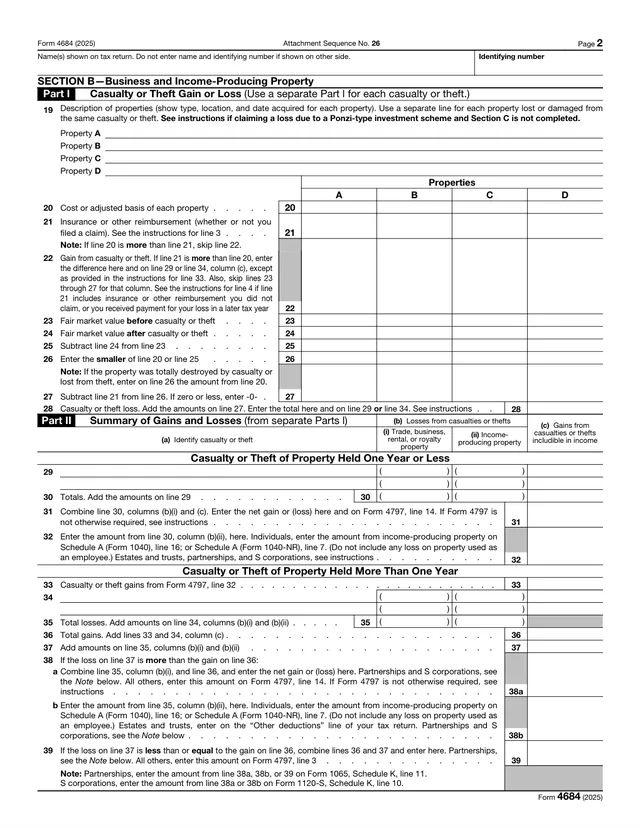
- Preview page 2 to confirm the form name and revision.
- Select Fill form to answer the form one page at a time.
- Type an answer for each field; checkboxes and choices use the form’s own options.
- Preview the finished pages, then download the flattened PDF.
- The downloaded copy is image-only, so it cannot be edited as a form again.
Keep the tax year and filing status consistent on every page. The editor keeps the original layout while you fill the existing fields.