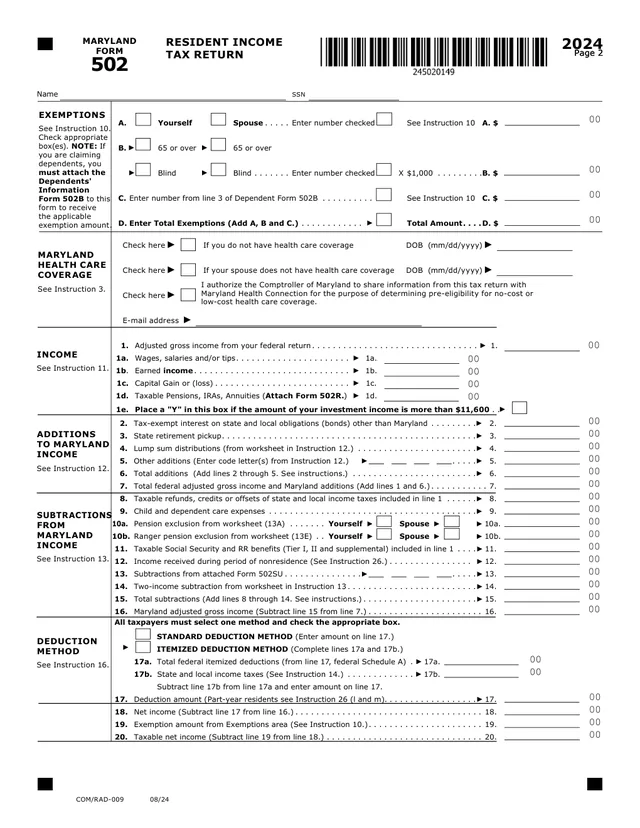
What's inside
Form content
$
$
MD
08/24
2024
COM/RAD-009
MARYLAND
FORM
502
RESIDENT INCOME
TAX RETURN
Print Using Blue or Black Ink Only
Place your W-2 wage and tax statements and ATTACH HERE with one staple. Do not attach check or money order to
Form 502. Attach check or money order to Form PV.
Dates of Maryland Residence (MM DD YYYY) FROM
TO
Other state of residence:
If you began or ended legal residence in Maryland in 2024 place a P in the box. . . . . . . . . . . . . . . . . .
MILITARY: If you or your spouse has non-Maryland military income, place an M in the box.. . . . . .
Enter Military Income amount here:
1.
Single (If you can be claimed on another person’s tax return, use Filing Status 6.)
2.
Married filing joint return or spouse had no income
3.
Married filing separately, Spouse SSN
4.
Head of household
5.
Qualifying surviving spouse with dependent child
6.
Dependent taxpayer (Enter 0 in Exemption Box (A) - See Instruction 7.)
PART-YEAR
RESIDENT
See Instruction
26.
FILING
STATUS
CHECK ONE
BOX
See Instruction
1 if you are required to file.
Your Social Security Number
Spouse's Social Security Number
Your First Name
MI
Your Last Name
Spouse's First Name
MI
Spouse's Last Name
Current Mailing Address Li
How to fill it
Fill or edit this form in MePDF
- Preview page 2 to confirm the form name and revision.
- Select Fill form to answer the form one page at a time.
- Type an answer for each field; checkboxes and choices use the form’s own options.
- Preview the finished pages, then download the flattened PDF.
- The downloaded copy is image-only, so it cannot be edited as a form again.
Keep the tax year and filing status consistent on every page. The editor keeps the original layout while you fill the existing fields.