What's inside
Form content
(Rev. April 2017)
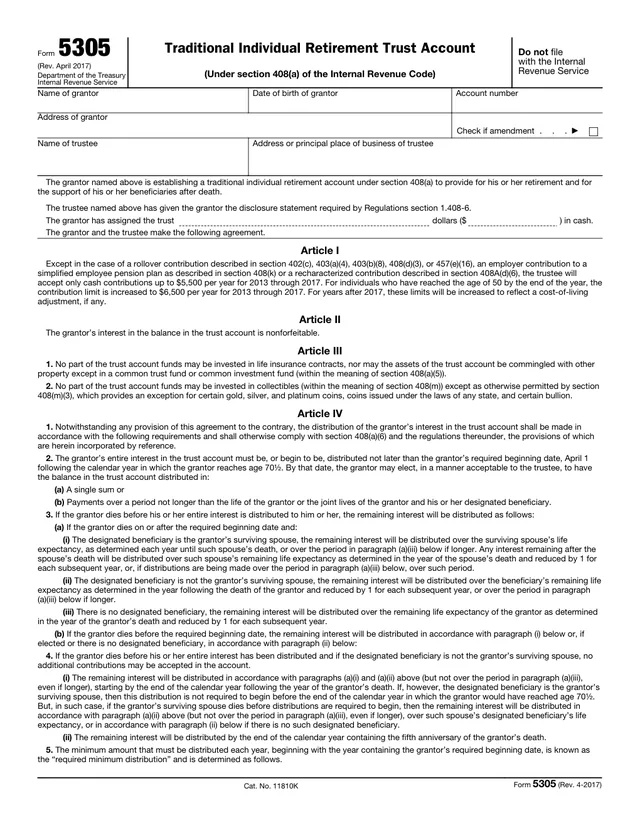
Traditional Individual Retirement Trust Account
(Under section 408(a) of the Internal Revenue Code)
Do not file with the Internal
Revenue Service
Name of grantor
Date of birth of grantor
Account number
Address of grantor
Check if amendment .
.
. ▶
Name of trustee
Address or principal place of business of trustee
The grantor named above is establishing a traditional individual retirement account under section 408(a) to provide for his or her retirement and for the support of his or her beneficiaries after death.
The trustee named above has given the grantor the disclosure statement required by Regulations section 1.408-6.
The grantor has assigned the trust dollars ($
) in cash.
The grantor and the trustee make the following agreement.
Article I
Except in the case of a rollover contribution described in section 402(c), 403(a)(4), 403(b)(8), 408(d)(3), or 457(e)(16), an employer contribution to a simplified employee pension plan as described in section 408(k) or a recharacterized contribution described in section 408A(d)(6), the trustee will accept only cash contributions up to $5,500 per year for 2013 through 2017. For individuals who have reached the age of 50 by t
How to fill it
Fill or edit this form in MePDF
- Preview page 1 to confirm the form name and revision.
- Select Fill form to answer the form one page at a time.
- Type an answer for each field; checkboxes and choices use the form’s own options.
- Preview the finished pages, then download the flattened PDF.
- The downloaded copy is image-only, so it cannot be edited as a form again.
Copy figures exactly from the statement and keep the currency clear. The editor keeps the original layout while you fill the existing fields.