What's inside
Form content
2025
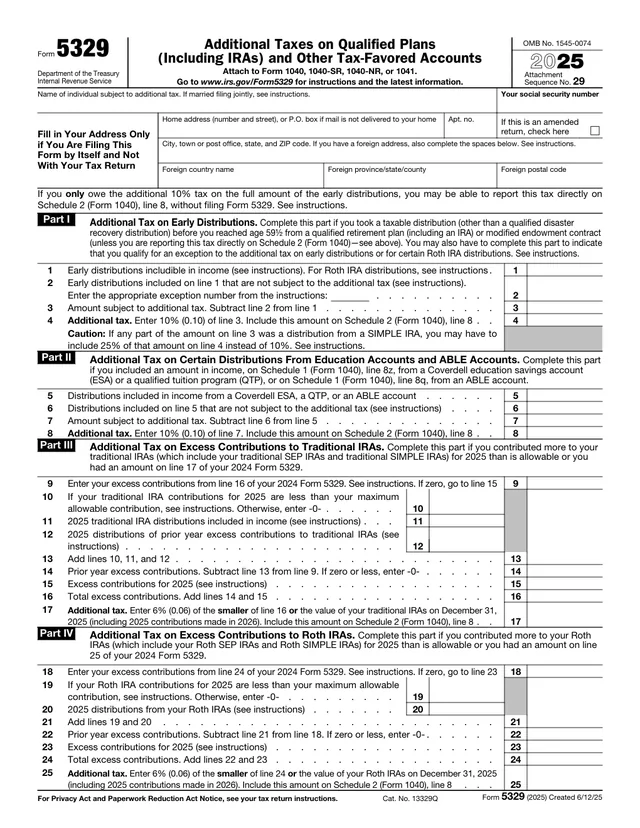
Additional Taxes on Qualified Plans
(Including IRAs) and Other Tax-Favored Accounts
Attach to Form 1040, 1040-SR, 1040-NR, or 1041.
Go to www.irs.gov/Form5329 for instructions and the latest information.
Attachment
Sequence No. 29
Name of individual subject to additional tax. If married filing jointly, see instructions.
Your social security number
Fill in Your Address Only if You Are Filing This
Form by Itself and Not
With Your Tax Return
Home address (number and street), or P.O. box if mail is not delivered to your home
Apt. no.
City, town or post office, state, and ZIP code. If you have a foreign address, also complete the spaces below. See instructions.
If this is an amended return, check here
Foreign country name
Foreign province/state/county
Foreign postal code
If you only owe the additional 10% tax on the full amount of the early distributions, you may be able to report this tax directly on
Schedule 2 (Form 1040), line 8, without filing Form 5329. See instructions.
Part I
Additional Tax on Early Distributions. Complete this part if you took a taxable distribution (other than a qualified disaster recovery distribution) before you reached age 59½ from a qualified retiremen
How to fill it
Fill or edit this form in MePDF
- Preview page 1 to confirm the form name and revision.
- Select Fill form to answer the form one page at a time.
- Type an answer for each field; checkboxes and choices use the form’s own options.
- Preview the finished pages, then download the flattened PDF.
- The downloaded copy is image-only, so it cannot be edited as a form again.
Keep the tax year and filing status consistent on every page. The editor keeps the original layout while you fill the existing fields.