What's inside
Form content
(Rev. November 2024)
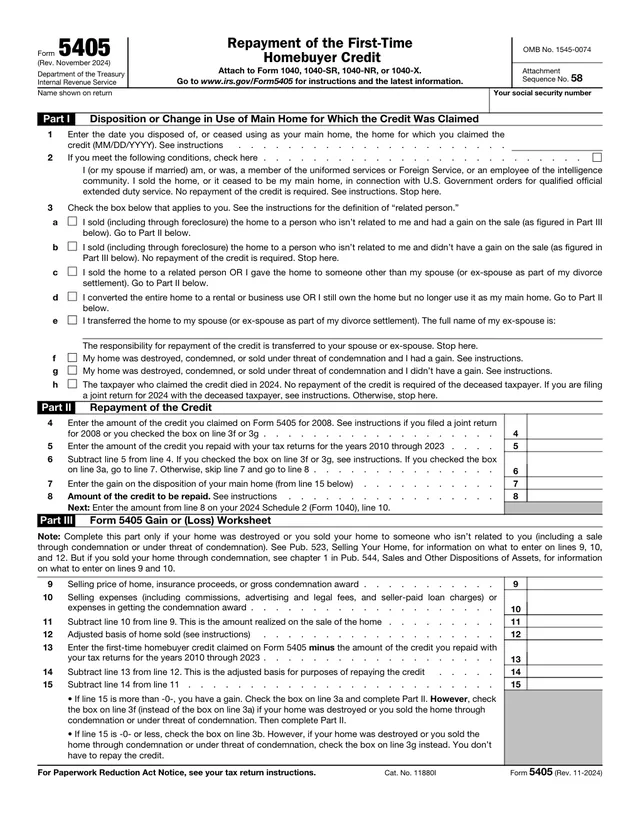
Repayment of the First-Time
Homebuyer Credit
Attach to Form 1040, 1040-SR, 1040-NR, or 1040-X.
Go to www.irs.gov/Form5405 for instructions and the latest information.
Attachment
Sequence No. 58
Name shown on return
Your social security number
Part I
Disposition or Change in Use of Main Home for Which the Credit Was Claimed
1
Enter the date you disposed of, or ceased using as your main home, the home for which you claimed the credit (MM/DD/YYYY). See instructions
.
.
.
.
.
.
.
.
.
.
.
.
.
.
.
.
.
.
.
.
.
.
2
If you meet the following conditions, check here .
.
.
.
.
.
.
.
.
.
.
.
.
.
.
.
.
.
.
.
.
.
.
.
.
.
I (or my spouse if married) am, or was, a member of the uniformed services or Foreign Service, or an employee of the intelligence community. I sold the home, or it ceased to be my main home, in connection with U.S. Government orders for qualified official extended duty service. No repayment of the credit is required. See instructions. Stop here.
3
Check the box below that applies to you. See the instructions for the definition of “related person.” a
I sold (including through foreclosure) the home to a person who isn’t related to me and had a gain on the sale
How to fill it
Fill or edit this form in MePDF
- Preview page 1 to confirm the form name and revision.
- Select Fill form to answer the form one page at a time.
- Type an answer for each field; checkboxes and choices use the form’s own options.
- Preview the finished pages, then download the flattened PDF.
- The downloaded copy is image-only, so it cannot be edited as a form again.
Keep the tax year and filing status consistent on every page. The editor keeps the original layout while you fill the existing fields.