What's inside
Form content
(Rev. October 2018)
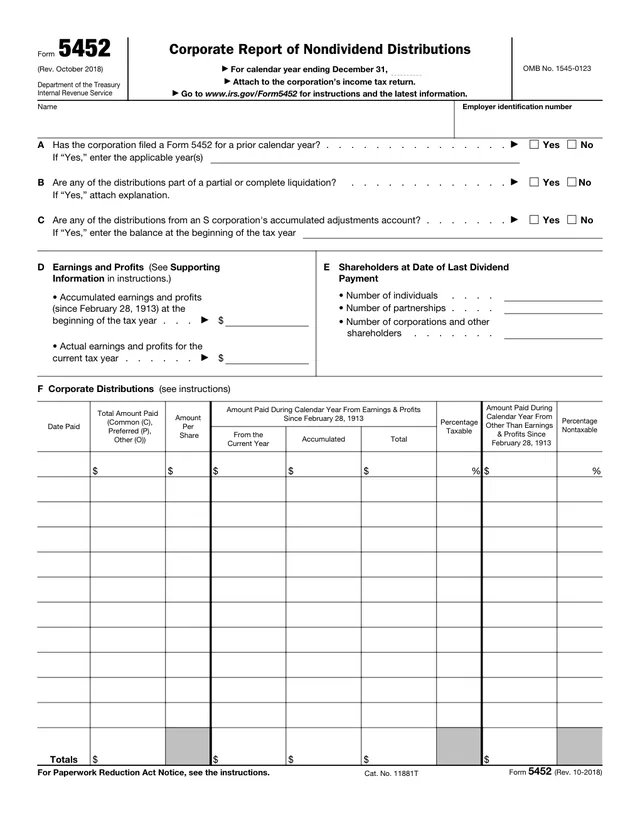
Corporate Report of Nondividend Distributions
▶ For calendar year ending December 31,
▶ Attach to the corporation’s income tax return.
▶ Go to www.irs.gov/Form5452 for instructions and the latest information.
Name
Employer identification number
A Has the corporation filed a Form 5452 for a prior calendar year? .
.
.
.
.
.
.
.
.
.
.
.
.
.
. ▶
Yes
No
If “Yes,” enter the applicable year(s)
B Are any of the distributions part of a partial or complete liquidation?
.
.
.
.
.
.
.
.
.
.
.
.
. ▶
Yes
No
If “Yes,” attach explanation.
C
Are any of the distributions from an S corporation's accumulated adjustments account? .
.
.
.
.
.
. ▶
Yes
No
If “Yes,” enter the balance at the beginning of the tax year
D
Earnings and Profits (See Supporting
Information in instructions.)
• Accumulated earnings and profits
(since February 28, 1913) at the beginning of the tax year .
.
.
▶ $
• Actual earnings and profits for the current tax year .
.
.
.
.
.
▶
$
E
Shareholders at Date of Last Dividend
Payment
• Number of individuals
.
.
.
.
• Number of partnerships .
.
.
.
• Number of corporations and other shareholders
.
.
.
.
.
.
.
F Corporate Distributions (see instructions)
Date Paid
Total
How to fill it
Fill or edit this form in MePDF
- Preview page 1 to confirm the form name and revision.
- Select Fill form to answer the form one page at a time.
- Type an answer for each field; checkboxes and choices use the form’s own options.
- Preview the finished pages, then download the flattened PDF.
- The downloaded copy is image-only, so it cannot be edited as a form again.
Keep the tax year and filing status consistent on every page. The editor keeps the original layout while you fill the existing fields.