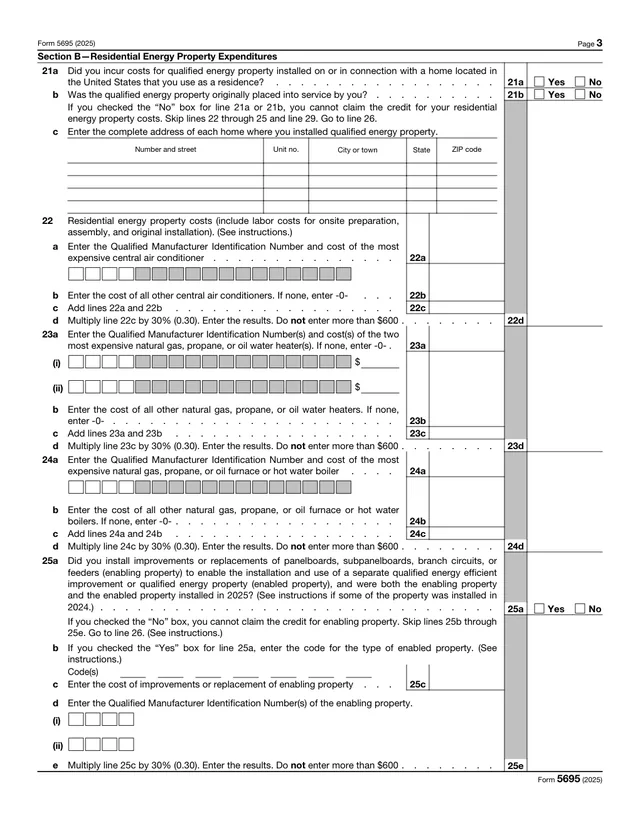
What's inside
Form content
2025
Residential Energy Credits
Attach to Form 1040, 1040-SR, or 1040-NR.
Go to www.irs.gov/Form5695 for instructions and the latest information.
Attachment
Sequence No. 75
Name(s) shown on return
Your social security number
Part I
Residential Clean Energy Credit (See instructions before completing this part.)
Note: Skip lines 1 through 11 if you only have a credit carryforward from 2024.
Enter the complete address of the home where you installed the property and/or technology associated with lines 1 through 4 and 5b.
For more than one home, see instructions.
Number and street
Unit no.
City or town
State
ZIP code
1
Qualified solar electric property costs
.
.
.
.
.
.
.
.
.
.
.
.
.
.
.
.
.
.
.
.
.
1
2
Qualified solar water heating property costs
.
.
.
.
.
.
.
.
.
.
.
.
.
.
.
.
.
.
.
2
3
Qualified small wind energy property costs
.
.
.
.
.
.
.
.
.
.
.
.
.
.
.
.
.
.
.
3
4
Qualified geothermal heat pump property costs .
.
.
.
.
.
.
.
.
.
.
.
.
.
.
.
.
.
4
5 a
Qualified battery storage technology. Does the qualified battery storage technology have a capacity of at least 3 kilowatt hours? (See instructions.) If you checked the “No” box, you cannot claim a credit for qualified battery stor
How to fill it
Fill or edit this form in MePDF
- Preview page 3 to confirm the form name and revision.
- Select Fill form to answer the form one page at a time.
- Type an answer for each field; checkboxes and choices use the form’s own options.
- Preview the finished pages, then download the flattened PDF.
- The downloaded copy is image-only, so it cannot be edited as a form again.
Keep the tax year and filing status consistent on every page. The editor keeps the original layout while you fill the existing fields.