What's inside
Form content
(Rev. November 2025)
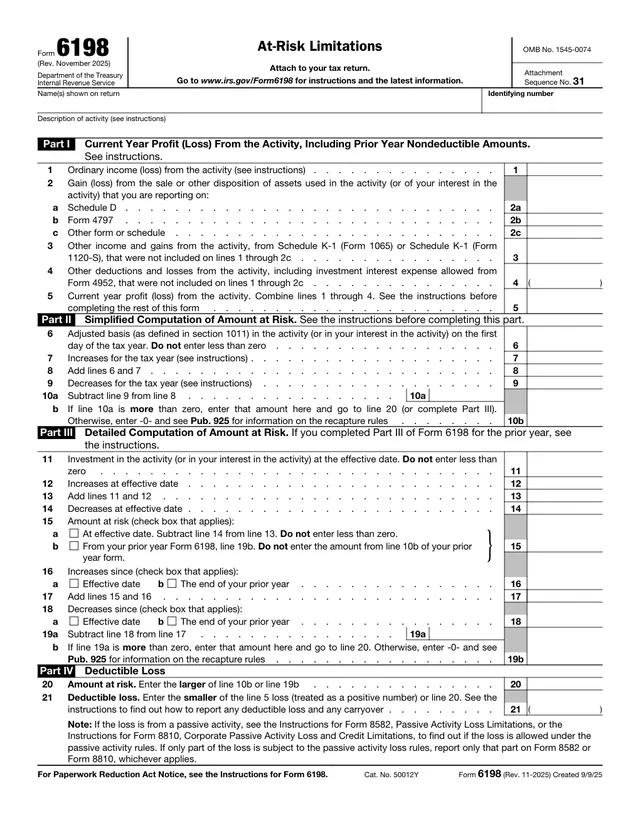
At-Risk Limitations
Attach to your tax return.
Go to www.irs.gov/Form6198 for instructions and the latest information.
Attachment
Sequence No. 31
Name(s) shown on return
Identifying number
Description of activity (see instructions)
Part I
Current Year Profit (Loss) From the Activity, Including Prior Year Nondeductible Amounts.
See instructions.
1
Ordinary income (loss) from the activity (see instructions) .
.
.
.
.
.
.
.
.
.
.
.
.
.
.
1
2
Gain (loss) from the sale or other disposition of assets used in the activity (or of your interest in the activity) that you are reporting on:
a
Schedule D .
.
.
.
.
.
.
.
.
.
.
.
.
.
.
.
.
.
.
.
.
.
.
.
.
.
.
.
.
.
2a b
.
.
.
.
.
.
.
.
.
.
.
.
.
.
.
.
.
.
.
.
.
.
.
.
.
.
.
.
.
.
2b c
Other form or schedule
.
.
.
.
.
.
.
.
.
.
.
.
.
.
.
.
.
.
.
.
.
.
.
.
.
.
2c
3
Other income and gains from the activity, from Schedule K-1 (Form 1065) or Schedule K-1 (Form
1120-S), that were not included on lines 1 through 2c .
.
.
.
.
.
.
.
.
.
.
.
.
.
.
.
3
4
Other deductions and losses from the activity, including investment interest expense allowed from
Form 4952, that were not included on lines 1 through 2c
.
.
.
.
.
.
.
.
.
.
.
.
.
.
.
4
How to fill it
Fill or edit this form in MePDF
- Preview page 1 to confirm the form name and revision.
- Select Fill form to answer the form one page at a time.
- Type an answer for each field; checkboxes and choices use the form’s own options.
- Preview the finished pages, then download the flattened PDF.
- The downloaded copy is image-only, so it cannot be edited as a form again.
Keep the tax year and filing status consistent on every page. The editor keeps the original layout while you fill the existing fields.