What's inside
Form content
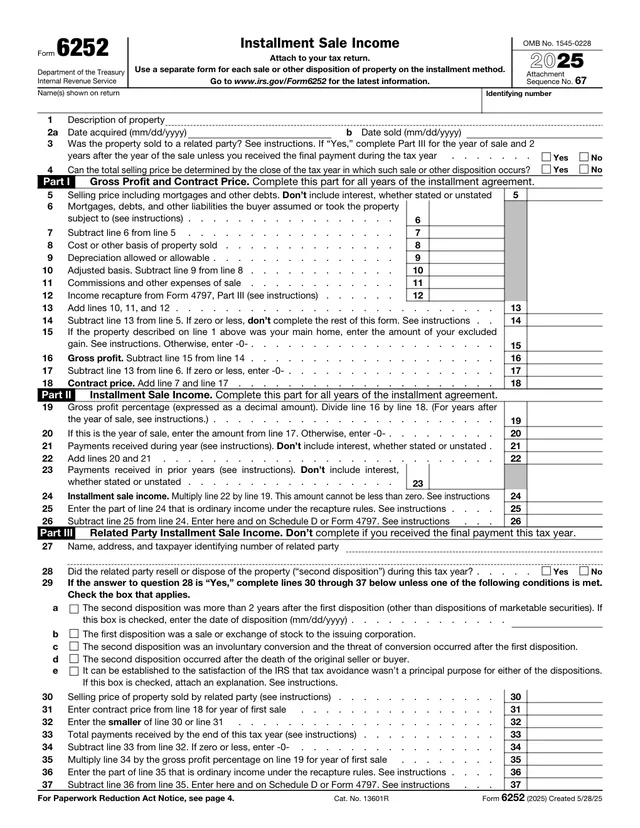
Installment Sale Income
Attach to your tax return.
Use a separate form for each sale or other disposition of property on the installment method.
Go to www.irs.gov/Form6252 for the latest information.
2025
Attachment
Sequence No. 67
Name(s) shown on return
Identifying number
1
Description of property
2 a
Date acquired (mm/dd/yyyy) b
Date sold (mm/dd/yyyy)
3
Was the property sold to a related party? See instructions. If “Yes,” complete Part III for the year of sale and 2 years after the year of the sale unless you received the final payment during the tax year
.
.
.
.
.
.
.
Yes
No
4
Can the total selling price be determined by the close of the tax year in which such sale or other disposition occurs?
Yes
No
Part I
Gross Profit and Contract Price. Complete this part for all years of the installment agreement.
5
Selling price including mortgages and other debts. Don’t include interest, whether stated or unstated
5
6
Mortgages, debts, and other liabilities the buyer assumed or took the property subject to (see instructions) .
.
.
.
.
.
.
.
.
.
.
.
.
.
.
.
.
6
7
Subtract line 6 from line 5
.
.
.
.
.
.
.
.
.
.
.
.
.
.
.
.
.
7
8
Cost or other basis of property sold .
.
.
.
.
.
.
.
.
.
.
.
.
How to fill it
Fill or edit this form in MePDF
- Preview page 1 to confirm the form name and revision.
- Select Fill form to answer the form one page at a time.
- Type an answer for each field; checkboxes and choices use the form’s own options.
- Preview the finished pages, then download the flattened PDF.
- The downloaded copy is image-only, so it cannot be edited as a form again.
Keep the tax year and filing status consistent on every page. The editor keeps the original layout while you fill the existing fields.