What's inside
Form content
(Rev. December 2023)
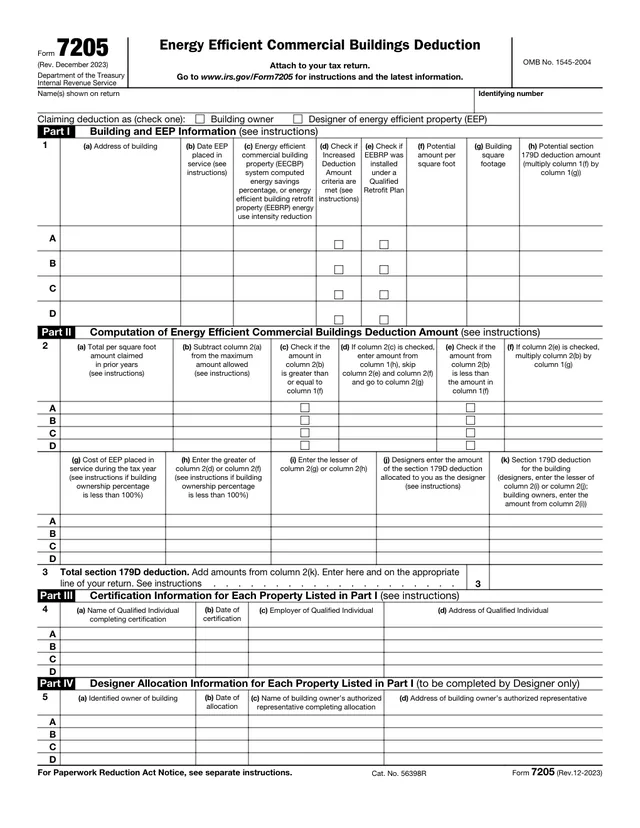
Energy Efficient Commercial Buildings Deduction
Attach to your tax return.
Go to www.irs.gov/Form7205 for instructions and the latest information.
Name(s) shown on return
Identifying number
Claiming deduction as (check one):
Building owner
Designer of energy efficient property (EEP)
Part I
Building and EEP Information (see instructions)
1
(a) Address of building
(b) Date EEP placed in service (see instructions)
(c) Energy efficient commercial building property (EECBP) system computed energy savings percentage, or energy efficient building retrofit property (EEBRP) energy use intensity reduction
(d) Check if
Increased
Deduction
Amount criteria are met (see instructions)
(e) Check if
EEBRP was installed under a
Qualified
Retrofit Plan
(f) Potential amount per square foot
(g) Building square footage
(h) Potential section
179D deduction amount
(multiply column 1(f) by column 1(g))
A
B
C
D
Part II
Computation of Energy Efficient Commercial Buildings Deduction Amount (see instructions)
2
(a) Total per square foot amount claimed in prior years
(see instructions)
(b) Subtract column 2(a) from the maximum amount allowed
(see instructions)
(c) Check if the amount in colu
How to fill it
Fill or edit this form in MePDF
- Preview page 1 to confirm the form name and revision.
- Select Fill form to answer the form one page at a time.
- Type an answer for each field; checkboxes and choices use the form’s own options.
- Preview the finished pages, then download the flattened PDF.
- The downloaded copy is image-only, so it cannot be edited as a form again.
Keep the tax year and filing status consistent on every page. The editor keeps the original layout while you fill the existing fields.