What's inside
Form content
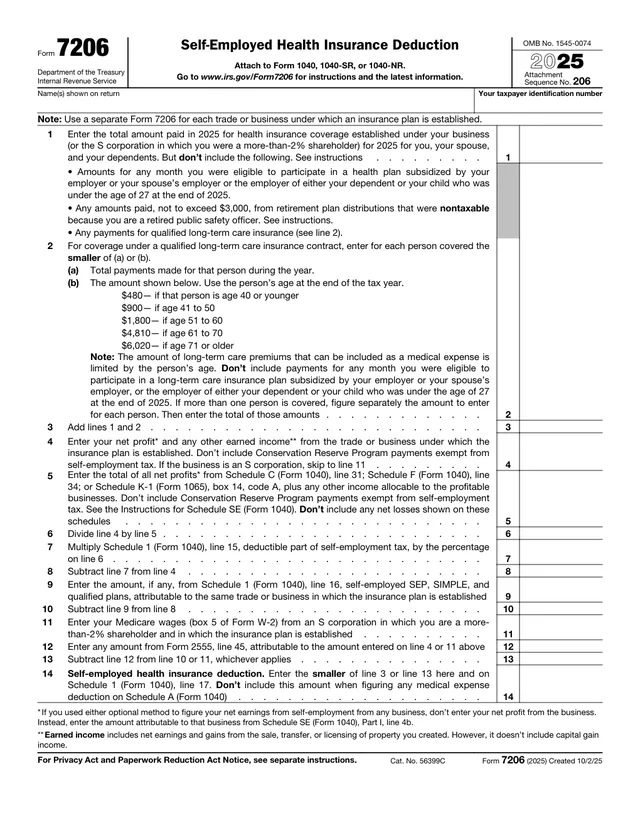
Self-Employed Health Insurance Deduction
Attach to Form 1040, 1040-SR, or 1040-NR.
Go to www.irs.gov/Form7206 for instructions and the latest information.
2025
Attachment
Sequence No. 206
Name(s) shown on return
Your taxpayer identification number
Note: Use a separate Form 7206 for each trade or business under which an insurance plan is established.
1
Enter the total amount paid in 2025 for health insurance coverage established under your business
(or the S corporation in which you were a more-than-2% shareholder) for 2025 for you, your spouse, and your dependents. But don’t include the following. See instructions
.
.
.
.
.
.
.
.
.
1
• Amounts for any month you were eligible to participate in a health plan subsidized by your employer or your spouse’s employer or the employer of either your dependent or your child who was under the age of 27 at the end of 2025.
• Any amounts paid, not to exceed $3,000, from retirement plan distributions that were nontaxable because you are a retired public safety officer. See instructions.
• Any payments for qualified long-term care insurance (see line 2).
2
For coverage under a qualified long-term care insurance contract, enter for each person cove
How to fill it
Fill or edit this form in MePDF
- Preview page 1 to confirm the form name and revision.
- Select Fill form to answer the form one page at a time.
- Type an answer for each field; checkboxes and choices use the form’s own options.
- Preview the finished pages, then download the flattened PDF.
- The downloaded copy is image-only, so it cannot be edited as a form again.
Keep the tax year and filing status consistent on every page. The editor keeps the original layout while you fill the existing fields.