What's inside
Form content
(Rev. December 2025)
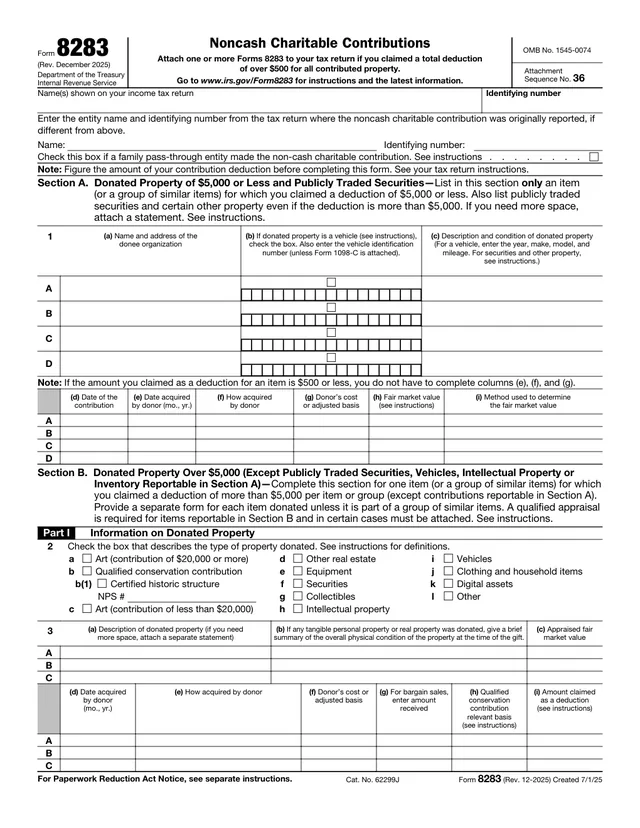
Noncash Charitable Contributions
Attach one or more Forms 8283 to your tax return if you claimed a total deduction of over $500 for all contributed property.
Go to www.irs.gov/Form8283 for instructions and the latest information.
Attachment
Sequence No. 36
Name(s) shown on your income tax return
Identifying number
Enter the entity name and identifying number from the tax return where the noncash charitable contribution was originally reported, if different from above.
Name:
Identifying number:
Check this box if a family pass-through entity made the non-cash charitable contribution. See instructions .
.
.
.
.
.
.
.
Note: Figure the amount of your contribution deduction before completing this form. See your tax return instructions.
Section A. Donated Property of $5,000 or Less and Publicly Traded Securities—List in this section only an item
(or a group of similar items) for which you claimed a deduction of $5,000 or less. Also list publicly traded securities and certain other property even if the deduction is more than $5,000. If you need more space, attach a statement. See instructions.
1
(a) Name and address of the donee organization
(b) If donated property is
How to fill it
Fill or edit this form in MePDF
- Preview page 1 to confirm the form name and revision.
- Select Fill form to answer the form one page at a time.
- Type an answer for each field; checkboxes and choices use the form’s own options.
- Preview the finished pages, then download the flattened PDF.
- The downloaded copy is image-only, so it cannot be edited as a form again.
Keep the tax year and filing status consistent on every page. The editor keeps the original layout while you fill the existing fields.