What's inside
Form content
2025
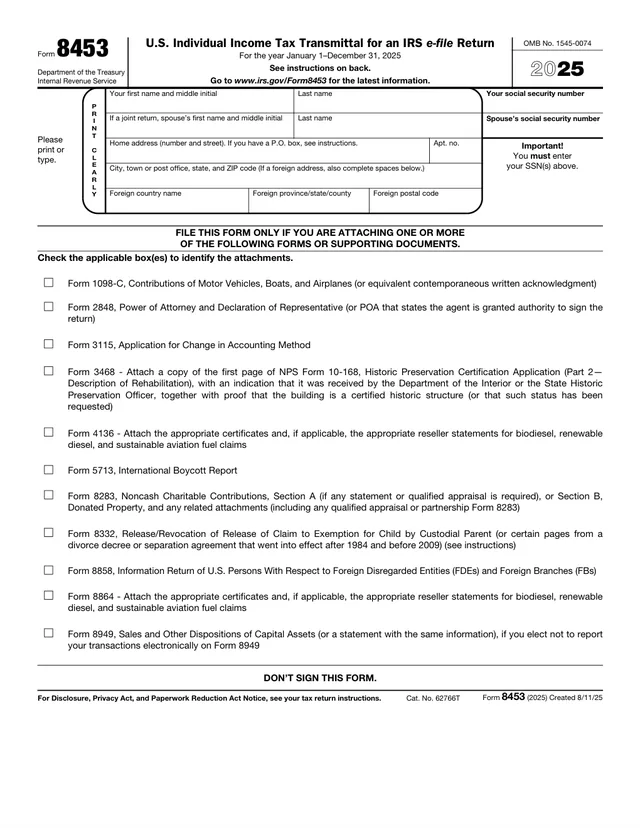
U.S. Individual Income Tax Transmittal for an IRS e-file Return
For the year January 1–December 31, 2025
See instructions on back.
Go to www.irs.gov/Form8453 for the latest information.
Please print or type.
P
R
I
N
T
C
L
E
A
R
L
Y
Your first name and middle initial
Last name
Your social security number
If a joint return, spouse’s first name and middle initial
Last name
Spouse’s social security number
Important!
You must enter your SSN(s) above.
Home address (number and street). If you have a P.O. box, see instructions.
Apt. no.
City, town or post office, state, and ZIP code (If a foreign address, also complete spaces below.)
Foreign country name
Foreign province/state/county
Foreign postal code
FILE THIS FORM ONLY IF YOU ARE ATTACHING ONE OR MORE
OF THE FOLLOWING FORMS OR SUPPORTING DOCUMENTS.
Check the applicable box(es) to identify the attachments.
Form 1098-C, Contributions of Motor Vehicles, Boats, and Airplanes (or equivalent contemporaneous written acknowledgment)
Form 2848, Power of Attorney and Declaration of Representative (or POA that states the agent is granted authority to sign the return)
Form 3115, Application for Change in Accounting Method
Form 3468 - Attach a
How to fill it
Fill or edit this form in MePDF
- Preview page 1 to confirm the form name and revision.
- Select Fill form to answer the form one page at a time.
- Type an answer for each field; checkboxes and choices use the form’s own options.
- Preview the finished pages, then download the flattened PDF.
- The downloaded copy is image-only, so it cannot be edited as a form again.
Keep the tax year and filing status consistent on every page. The editor keeps the original layout while you fill the existing fields.