What's inside
Form content
(Rev. October 2016)
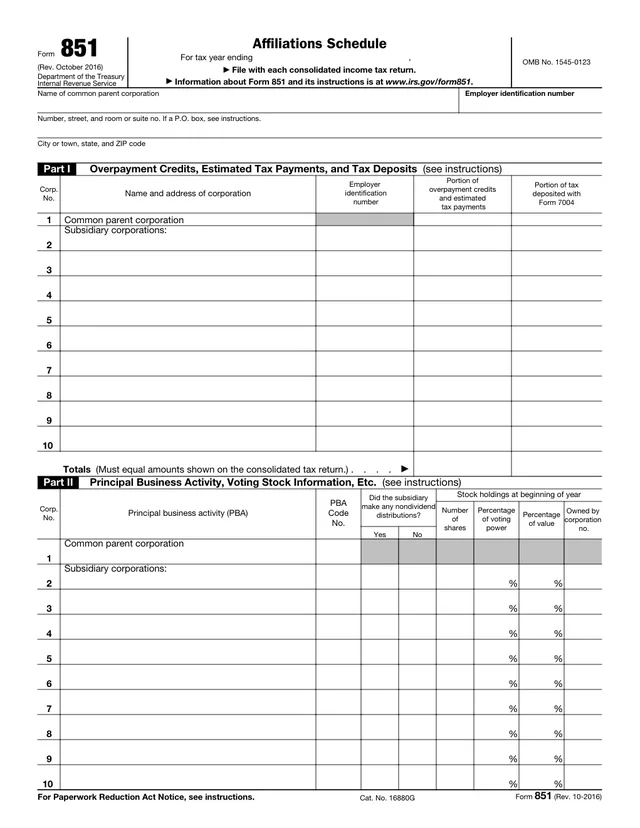
Affiliations Schedule
For tax year ending
,
▶ File with each consolidated income tax return.
▶ Information about Form 851 and its instructions is at www.irs.gov/form851.
Name of common parent corporation
Employer identification number
Number, street, and room or suite no. If a P.O. box, see instructions.
City or town, state, and ZIP code
Part I
Overpayment Credits, Estimated Tax Payments, and Tax Deposits (see instructions)
Corp.
No.
Name and address of corporation
Employer identification number
Portion of overpayment credits and estimated tax payments
Portion of tax deposited with
1
Common parent corporation
2
Subsidiary corporations:
3
4
5
6
7
8
9
10
Totals (Must equal amounts shown on the consolidated tax return.) .
.
.
. ▶
Part II
Principal Business Activity, Voting Stock Information, Etc. (see instructions)
Corp.
No.
Principal business activity (PBA)
PBA
Code
No.
Did the subsidiary make any nondividend distributions?
Stock holdings at beginning of year
Number of shares
Percentage of voting power
Percentage of value
Owned by corporation no.
Yes
No
1
Common parent corporation
2
Subsidiary corporations:
%
%
3
%
%
4
%
%
5
%
%
6
%
%
7
%
%
8
%
%
9
%
%
10
%
%
For
How to fill it
Fill or edit this form in MePDF
- Preview page 1 to confirm the form name and revision.
- Select Fill form to answer the form one page at a time.
- Type an answer for each field; checkboxes and choices use the form’s own options.
- Preview the finished pages, then download the flattened PDF.
- The downloaded copy is image-only, so it cannot be edited as a form again.
Keep the tax year and filing status consistent on every page. The editor keeps the original layout while you fill the existing fields.