What's inside
Form content
(Rev. January 2024)
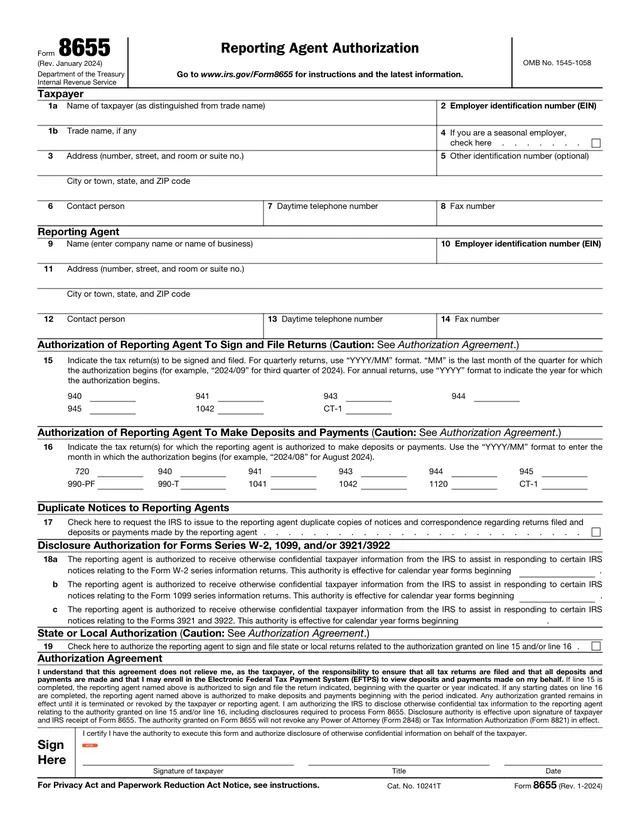
Reporting Agent Authorization
Go to www.irs.gov/Form8655 for instructions and the latest information.
Taxpayer
1a Name of taxpayer (as distinguished from trade name)
1b Trade name, if any
2 Employer identification number (EIN)
3 Address (number, street, and room or suite no.)
City or town, state, and ZIP code
4 If you are a seasonal employer, check here
.
.
.
.
.
.
.
5 Other identification number (optional)
6 Contact person
7 Daytime telephone number
8 Fax number
Reporting Agent
9 Name (enter company name or name of business)
10 Employer identification number (EIN)
11 Address (number, street, and room or suite no.)
City or town, state, and ZIP code
12 Contact person
13 Daytime telephone number
14 Fax number
Authorization of Reporting Agent To Sign and File Returns (Caution: See Authorization Agreement.)
15
Indicate the tax return(s) to be signed and filed. For quarterly returns, use “YYYY/MM” format. “MM” is the last month of the quarter for which the authorization begins (for example, “2024/09” for third quarter of 2024). For annual returns, use “YYYY” format to indicate the year for which the authorization begins.
940
941
943
944
945
1042
CT-1
Authorization of
How to fill it
Fill or edit this form in MePDF
- Preview page 1 to confirm the form name and revision.
- Select Fill form to answer the form one page at a time.
- Type an answer for each field; checkboxes and choices use the form’s own options.
- Preview the finished pages, then download the flattened PDF.
- The downloaded copy is image-only, so it cannot be edited as a form again.
Keep the tax year and filing status consistent on every page. The editor keeps the original layout while you fill the existing fields.