What's inside
Form content
(Rev. December 2025)
Interest Computation Under the Look-Back
Method for Completed Long-Term Contracts
Go to www.irs.gov/Form8697 for instructions and the latest information.
Attachment
Sequence No. 697
For the filing year beginning
, and ending
. See instructions.
Name
Number, street, and apt., room, or suite no. If a P.O. box, see instructions.
City or town
State or province
ZIP or foreign postal code
A Identifying number
B Check applicable box to show type of taxpayer:
Corporation
Individual
Estate or trust
S corporation
Partnership
C
If you were an owner of an interest in a pass-through entity (such as a partnership or an S corporation) that holds one or more long-term contracts to which this interest computation relates, enter the name and employer identification number of the entity. Attach a schedule if there is more than one such entity.
Name of entity
Employer identification number
Part I
Regular Method (see instructions)
Filing year
Year ended mo.
yr.
Redetermination years
(a)
Year ended mo.
yr.
(b)
Year ended mo.
yr.
(c)
Totals
(Add columns (a) and (b).)
1
Taxable income or loss for the prior years shown on tax return (or as previously adjusted) before net operating loss
How to fill it
Fill or edit this form in MePDF
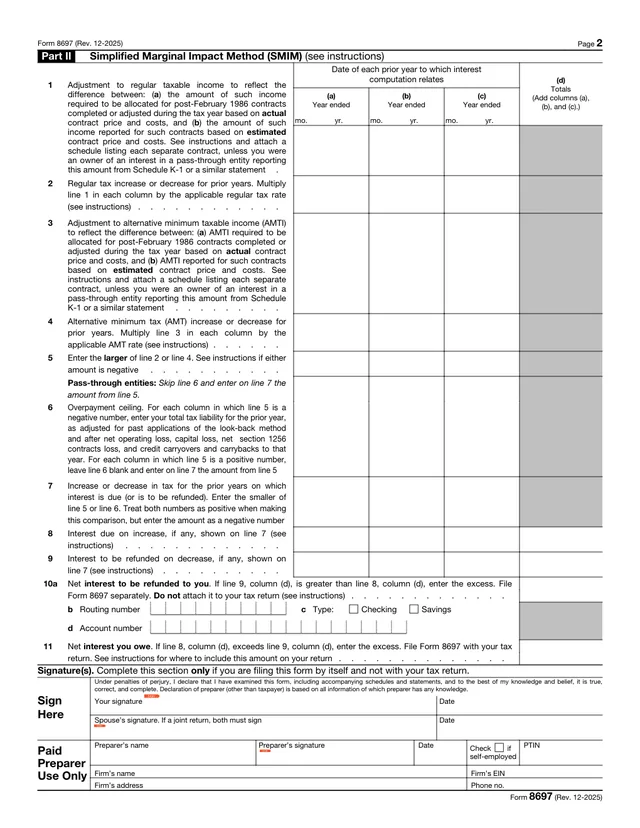
- Preview page 2 to confirm the form name and revision.
- Select Fill form to answer the form one page at a time.
- Type an answer for each field; checkboxes and choices use the form’s own options.
- Preview the finished pages, then download the flattened PDF.
- The downloaded copy is image-only, so it cannot be edited as a form again.
Keep the tax year and filing status consistent on every page. The editor keeps the original layout while you fill the existing fields.